
AI Viral Video Analysis Workflow: How to Summarize AI-Generated Videos with BibiGPT (2026)
AI-generated viral videos are flooding social media. This guide walks you through a 5-step workflow to discover, analyze, understand, and repurpose AI video content using BibiGPT — turning the AI video explosion into actionable knowledge.
AI Viral Video Analysis Workflow: How to Summarize AI-Generated Videos with BibiGPT (2026)
Table of Contents
- The AI Video Content Explosion
- Why You Need an AI Video Analysis Workflow
- 5-Step Workflow: Mastering AI Video Content with BibiGPT
- Real-World Example: Analyzing a Veo 3 Viral Video
- Advanced Tips: Collections and Batch Processing
- FAQ
- Conclusion
The AI Video Content Explosion
AI-generated viral videos are reshaping social media at an unprecedented pace. Einstein explaining cryptocurrency, Jesus browsing memes — videos created by Google Veo 3 and similar tools have racked up hundreds of millions of views. When AI generates the videos, you need AI to understand them.
Try pasting your video link
Supports YouTube, Bilibili, TikTok, Xiaohongshu and 30+ platforms
March 2026 marked two landmark events in the AI video landscape:
- AI video generation hit a tipping point: Google Veo 3 and next-generation video models can now produce photorealistic talking-head videos. "Einstein" explaining Bitcoin and historical figures delivering modern commentary went mega-viral on TikTok, YouTube, and Douyin — with single videos exceeding 100 million views.
- OpenAI shut down its Sora video creation app on March 25, 2026: Resources pivoted entirely to robotics and world simulation. We covered this in depth in our best Sora alternatives roundup.
What does this mean? The barrier to creating AI video content is collapsing, while the total volume is growing exponentially. Industry estimates suggest AI-generated videos now account for 15–20% of social media video content, up from roughly 5% a year ago.
For content creators, media operators, researchers, and knowledge workers, the challenge is no longer "how to make AI videos" — it is "how to efficiently extract value from the flood of AI videos."
Why You Need an AI Video Analysis Workflow
When AI-generated video becomes the new normal for information distribution, the old approach of manually watching and taking notes simply cannot keep up. Here are the problems you are likely facing:
Information overload: Thousands of AI-generated videos enter your feeds daily. Watching them one by one is impossible. You need a way to rapidly screen, evaluate, and distill the key content.
Truth verification: AI-generated videos can make any historical figure "speak," but the content may be entirely fabricated. You need tools that help you quickly trace and verify claims. Our AI video Q&A understanding guide covers this in detail.
Knowledge retention: You watch an insightful AI video, but forget it within days. You need a system to convert video content into articles, notes, mind maps, and other reusable knowledge products.
Cross-platform tracking: Trending AI videos are scattered across TikTok, YouTube, Bilibili, Douyin, and 30+ other platforms. Manually searching each one is painfully inefficient.
BibiGPT is built to solve exactly these problems. As the leading AI audio-video assistant with over 1 million active users and 5 million+ cumulative summaries, it does not generate videos — it helps you understand, digest, and repurpose video content.
5-Step Workflow: Mastering AI Video Content with BibiGPT
Here is the complete, battle-tested workflow covering the full pipeline from discovery to distribution.
Step 1: Discover — Track Trending AI Videos
Effective analysis starts with precision sourcing. Recommended approaches for tracking AI viral videos:
- Platform trending pages: Monitor TikTok, YouTube Trending, Bilibili Hot, and Douyin charts for videos tagged as AI-generated or sparking major discussion
- Community channels: AI-focused Discord servers, Twitter/X hashtags (e.g.,
#AIVideo,#Veo3,#AIGenerated), and Reddit communities often surface content first - BibiGPT search: Search keywords directly within BibiGPT to discover relevant content across platforms
Key principle: Do not try to watch every video. The whole point of this workflow is to help you capture 90% of the value in 10% of the time.
Step 2: Analyze — Paste the URL, Get Instant Insights
Once you have found a target video, open BibiGPT and paste the video URL. The system automatically delivers:
- Subtitle extraction and transcription: Supports 30+ platforms with high-accuracy speech recognition, converting audio into editable text
- AI-powered summary: Advanced models like GPT-4, Claude, and Gemini generate structured summaries including core arguments, key claims, and notable quotes
- AI visual content analysis: For purely visual content (like AI-generated videos without speech), BibiGPT can analyze what is happening on screen and extract visual information
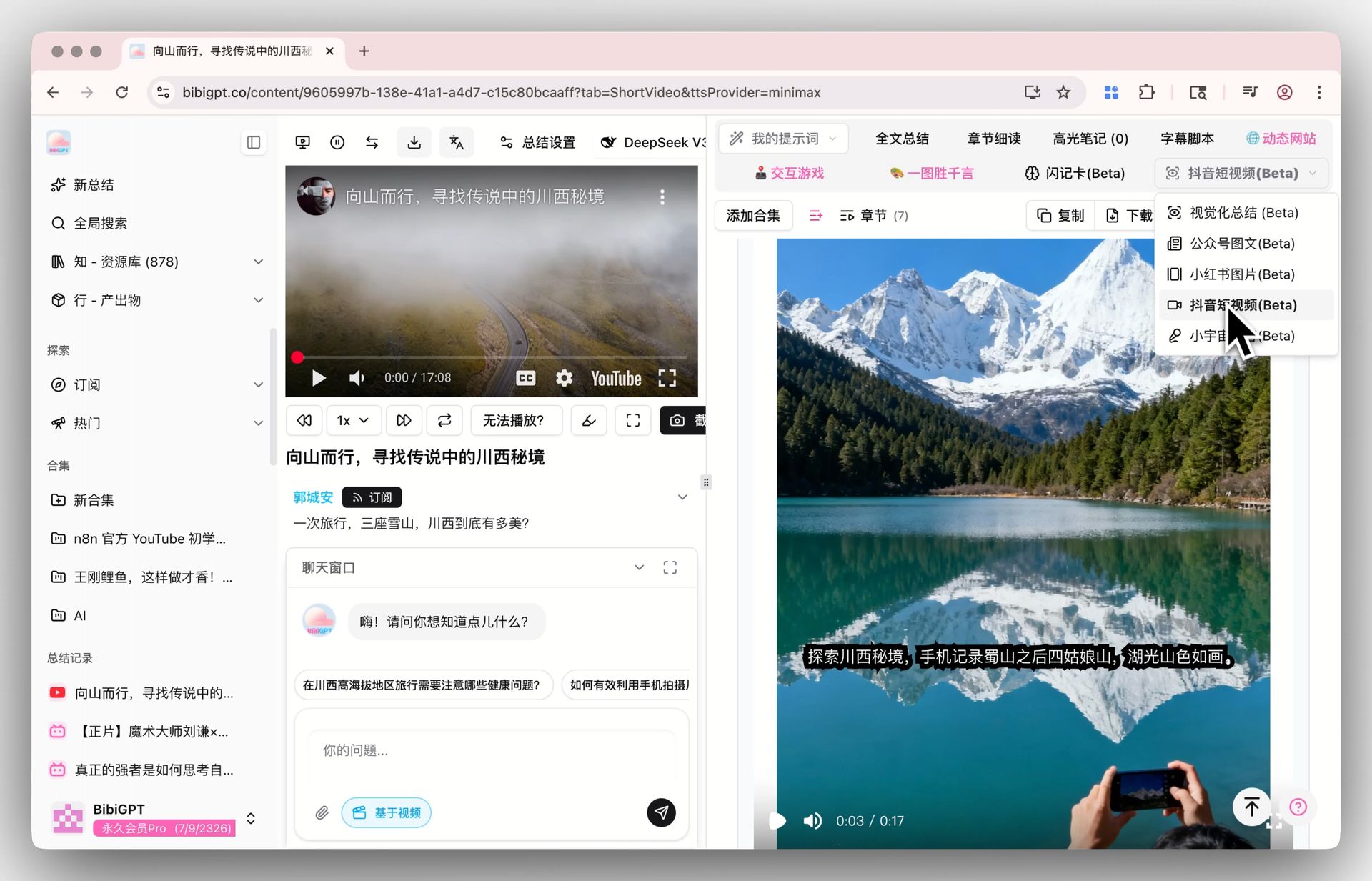 Douyin short video entry
This step is especially critical for AI-generated videos — because much of the "viral factor" lies not just in speech content but in visual presentation and production quality. BibiGPT's visual analysis captures information that traditional transcription tools miss entirely.
For Douyin-heavy users, our Douyin summary feature handles Douyin links natively. YouTube users can leverage AI YouTube Summary.
Step 3: Understand — AI Chat with Source Tracing
After receiving the summary, deeper understanding comes from follow-up questions. BibiGPT's AI chat feature allows you to:
- Ask questions about the video content: "What is the core argument of this video?" or "What data sources does the video cite?"
- Verify with source tracing: Every AI response includes timestamp citations, letting you jump directly to the corresponding moment in the original video. This is essential for detecting misinformation in AI-generated content.
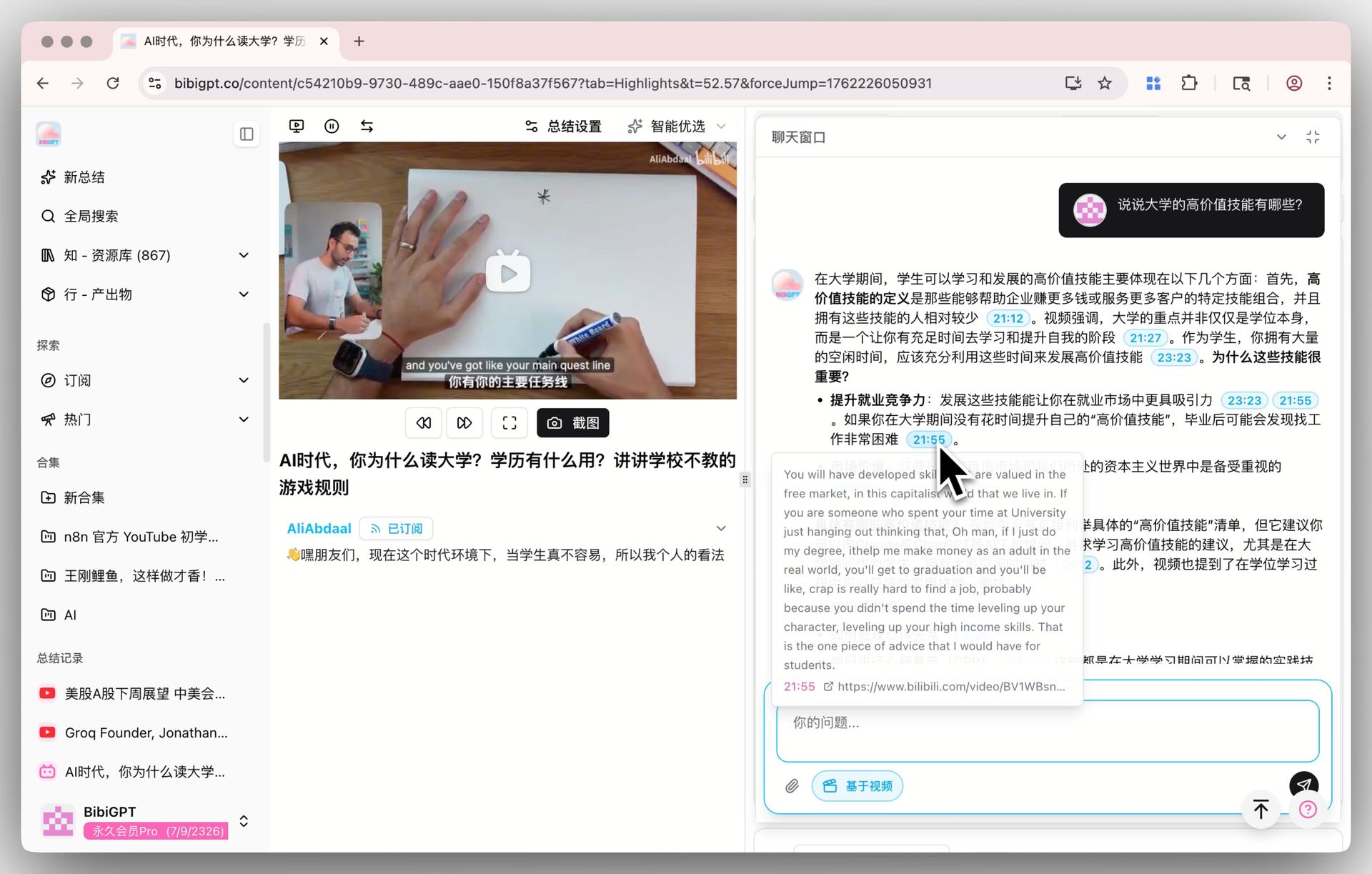 AI video dialog tracing
For AI viral videos, this step is uniquely valuable — you can quickly determine which claims in an "Einstein talks about crypto" video are based on real references and which are AI fabrications. For more on deep AI video understanding, see our AI video learning system guide.
Step 4: Create — Transform Analysis into Knowledge Products
The ultimate goal of analysis is output. BibiGPT offers multiple export formats:
- Video to illustrated article: One-click conversion of video analysis into structured, illustrated articles — ready for blogs, newsletters, or knowledge bases
- Mind maps: Visualize the core arguments from any video, helping you build knowledge frameworks rapidly
- Social media cards: Generate shareable quote cards for Twitter, Instagram, or LinkedIn
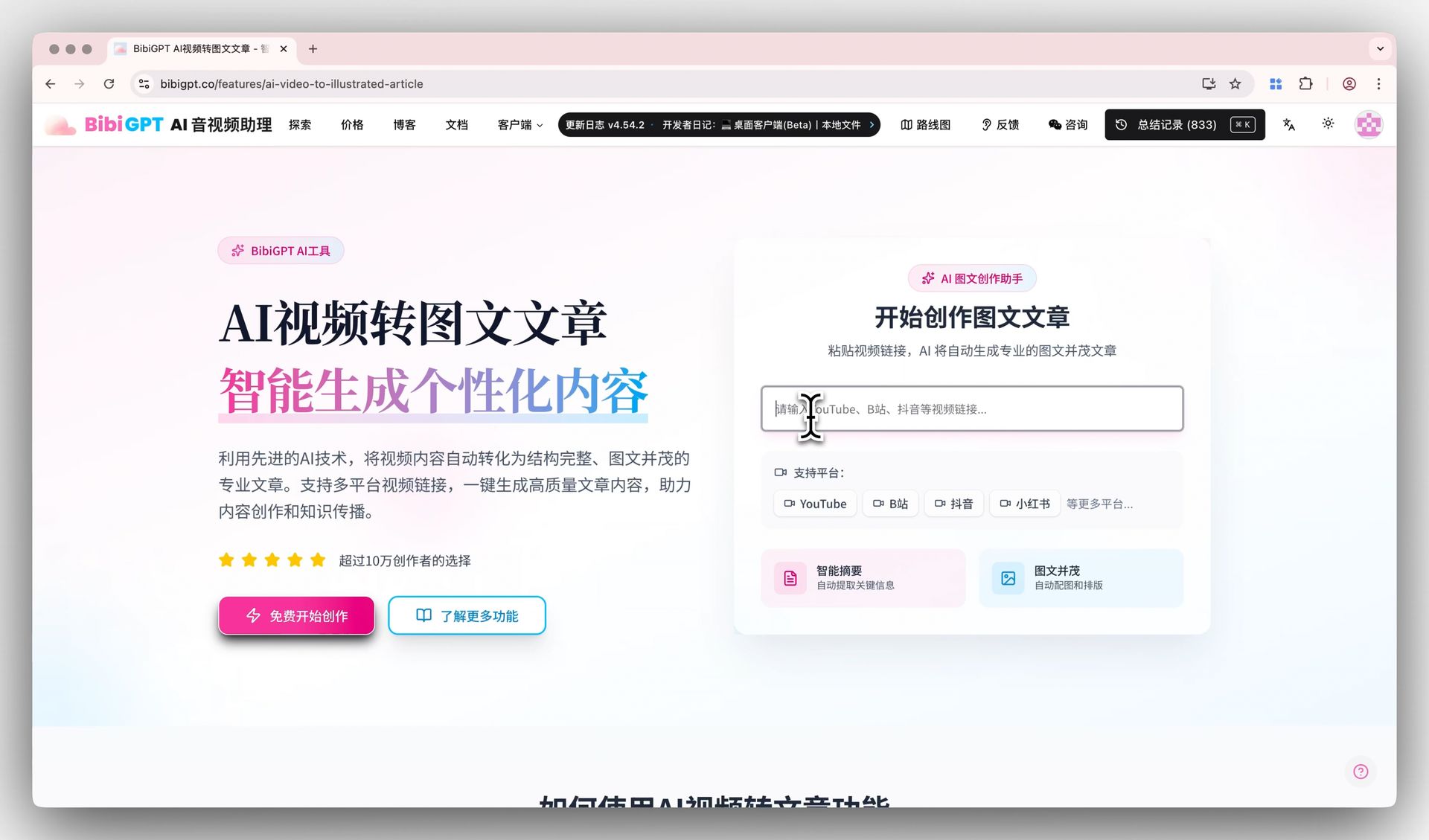 Video to article demo
For example: after analyzing five viral AI video trend pieces, you can use BibiGPT to generate a comprehensive "2026 AI Video Trends" article with data-backed insights and synthesized takeaways. For more content repurposing strategies, see our video content repurposing guide.
Step 5: Distribute — Amplify Across Platforms
The final step is distributing your knowledge products:
- Flexible export formats: Markdown, PDF, images, and more — each optimized for different platforms
- One-click sync: Export directly to Notion, Obsidian, and other popular note-taking tools
- Multi-platform adaptation: Generated content automatically adapts to formatting requirements of different platforms
From discovery to distribution, the core philosophy of this workflow is: use AI to understand AI. When video production is accelerated by AI, comprehension must be accelerated by AI too.
Real-World Example: Analyzing a Veo 3 Viral Video
Let us walk through the complete workflow with a concrete example. Imagine you spot an "Einstein explains cryptocurrency" video on TikTok, generated by Google Veo 3, with over 50 million views:
Step 1 — Discover: You see the video trending on TikTok or referenced in an AI community on Twitter/X.
Step 2 — Analyze: Copy the video URL and paste it into BibiGPT. Within 30 seconds, you receive:
- Full subtitle text (including all of "Einstein's" dialogue)
- Structured summary: core topic, key arguments, specific cryptocurrency names mentioned
- Visual analysis: description of the AI-generated "Einstein" likeness quality and scene design
Step 3 — Understand: Use AI chat to ask follow-up questions:
- "Are the cryptocurrency claims in this video supported by real data?"
- "Did Einstein ever express views on financial systems that relate to this content?"
- The AI responds with citations linking back to specific timestamps in the video
Step 4 — Create: Transform your analysis into an article titled "How AI Deepfake Videos Go Viral: A Content Propagation Analysis," examining why this type of content achieves such massive reach.
Step 5 — Distribute: Export as Markdown for your blog, generate social cards for Twitter and LinkedIn, sync the analysis to your Notion workspace for future reference.
The entire process takes under 15 minutes. Doing the same analysis manually would require 2–3 hours at minimum.
Advanced Tips: Collections and Batch Processing
Once AI video analysis becomes part of your daily routine, these advanced features can further boost your efficiency:
Collection Management
BibiGPT's collections feature lets you organize by topic:
- Create themed collections like "AI Viral Video Tracking," "Competitor Analysis," or "Industry Trends"
- Each video's summary results are automatically linked to its collection for easy retrieval
- Cross-collection search: quickly find where a keyword appears across all analyzed videos
For more on collection workflows, see our AI video collections organization guide.
Batch Processing
When a trending topic generates dozens of videos, pasting links one by one is inefficient. BibiGPT supports:
- Batch URL input: Paste multiple video links at once — the system queues and processes them automatically
- Playlist summarization: For YouTube playlists, paste the playlist URL to batch-summarize all videos
- Subscription monitoring: Follow specific channels or topics, and new videos automatically enter the analysis queue
Free Trial
If you have not tried BibiGPT yet, start with the free video summarizer — no registration required to experience the core capabilities.
FAQ
Can BibiGPT analyze all types of AI-generated videos?
Yes. BibiGPT's analysis capabilities work regardless of video origin — whether AI-generated (Veo 3, Runway, Pika, etc.), human-filmed, or screen-recorded. As long as there is extractable audio or subtitle content, BibiGPT delivers effective analysis. For purely visual AI videos without speech, the AI visual content analysis feature extracts information directly from video frames. Currently supports 30+ platforms, plus local file uploads.
How long does it take to learn this workflow?
Almost no learning curve. The core operation is "paste URL, read summary, ask questions, export." Most users complete their first end-to-end 5-step workflow within 10 minutes. BibiGPT's interface is designed for simplicity — no complex configuration needed.
Can BibiGPT detect misinformation in AI-generated videos?
BibiGPT's AI chat with source tracing helps you locate exactly where each claim originates in the original video, which is extremely useful for spotting fabricated content. However, BibiGPT is an information extraction and analysis tool, not a fact-checking service. For critical claims, we recommend combining BibiGPT's source tracing with independent verification from reliable external sources.
Can I use this workflow on the free plan?
BibiGPT offers a free tier that covers the core features. All five workflow steps — discover, analyze, understand, create, and distribute — are accessible within the free quota. If you need batch processing, advanced exports, or higher AI chat limits, you can upgrade to Plus or Pro.
Conclusion
In 2026, AI-generated video content is fundamentally reshaping how we consume and process information. When tools like Google Veo 3 can make anyone "speak" with photorealistic fidelity, the ability to verify, extract, and synthesize video content becomes more critical than ever.
Video generation tools solve the "creation" problem. BibiGPT solves the "understanding" problem. In the era of AI video content explosion, understanding is the truly scarce resource.
This 5-step workflow — Discover, Analyze, Understand, Create, Distribute — works not just for AI viral videos, but for all the video content you consume daily: YouTube tutorials, Bilibili knowledge videos, Douyin clips, podcast interviews, and everything in between.
Start your AI efficient learning journey now:
- 🌐 Official Website: https://aitodo.co
- 📱 Mobile Download: https://aitodo.co/app
- 💻 Desktop Download: https://aitodo.co/download/desktop
- ✨ Learn More Features: https://aitodo.co/features
— BibiGPT Team