
Best YouSubtitles Alternatives 2026: 6 AI Video Subtitle Tools Compared
Looking for a YouSubtitles alternative that handles more than YouTube? We compare 6 tools (BibiGPT, DownSub, YouSubtitles, SaveSubs, Subtitle Edit, NoteGPT) across platform coverage, AI transcription, hard-subtitle OCR, translation, and one-click summaries.
Best YouSubtitles Alternatives 2026: 6 AI Video Subtitle Tools Compared
Table of Contents
- What is the best YouSubtitles alternative?
- How to choose: it is not just "download subtitles"
- 6 YouSubtitles alternatives compared
- Decision table by use case
- Why BibiGPT stands out
- FAQ
- Wrap-up
What is the best YouSubtitles alternative?
Quick answer: If you only need to grab ready-made CC subtitles from YouTube, free utilities like DownSub or SaveSubs are enough. If you also process Bilibili, TikTok, podcasts, lectures, or local recordings — and want AI summaries, translation, and SRT export in the same flow — BibiGPT is the most complete YouSubtitles alternative in 2026. It covers 30+ platforms and turns any URL into time-stamped subtitles, structured summaries, and bilingual translations in a single click.
试试粘贴你的视频链接
支持 YouTube、B站、抖音、小红书等 30+ 平台
YouSubtitles was a pioneer of YouTube caption downloaders, focused on one scenario: scraping existing CC tracks. But content consumption has already moved beyond YouTube into Bilibili, Spotify podcasts, TikTok shorts, and local lecture recordings. Users now want:
- Multi-platform coverage beyond YouTube
- Transcription for videos without captions (lectures, livestreams, interviews)
- Post-processing — summaries, translation, export-ready notes
- Accuracy guarantees, including hard subtitles burned into the frame
These needs produced a whole generation of YouSubtitles alternatives. This article compares six of the most common ones based on real use.
How to choose: it is not just "download subtitles"
Quick answer: A serious YouSubtitles alternative should be evaluated on at least five axes — platform coverage, support for videos without captions, translation, export formats, and downstream AI features beyond a raw SRT.
| Dimension | Description | Why it matters |
|---|---|---|
| Platform coverage | How many video/audio sources | You watch more than YouTube |
| No-caption fallback | AI transcription for videos without CC | Required for lectures, livestreams |
| Accuracy | ASR + hard-subtitle OCR precision | Drives translation & note quality |
| Translation | Multilingual, line-by-line with timestamps | Needed for localization, study |
| Export formats | SRT / VTT / TXT / Markdown | Determines pipeline compatibility |
| AI summary & notes | Structured output beyond plain text | Saves copying text into ChatGPT |
A pure subtitle downloader only solves dimensions 1-2. An AI video assistant like BibiGPT covers all six.
6 YouSubtitles alternatives compared
1. BibiGPT — Best overall alternative
Positioning: An AI audio/video assistant where subtitle extraction is one of many capabilities.
- ✅ Platform coverage: 30+ — YouTube, Bilibili, TikTok/Douyin, Xiaohongshu, Spotify, podcast apps, local files, cloud-drive auto-sync
- ✅ No-caption videos — built-in ASR with switchable ElevenLabs Scribe engine for premium accuracy
- ✅ Hard-subtitle OCR (Beta) — reads burned-in captions directly from the frame in 6 languages
- ✅ Translation — line-by-line with preserved timestamps, bilingual SRT output
- ✅ Export — SRT / VTT / TXT / Markdown / PDF, optional raw-subtitle inclusion in notes
- ✅ AI summary — structured chapters, timestamps, mind maps from the same URL
- ⚠️ Some premium features (hard-subtitle OCR, video-to-article) require a Pro plan
You can try the core extractor directly — see the Bilibili subtitle downloader, YouTube subtitle downloader, and video subtitle translation feature pages — just paste a link.
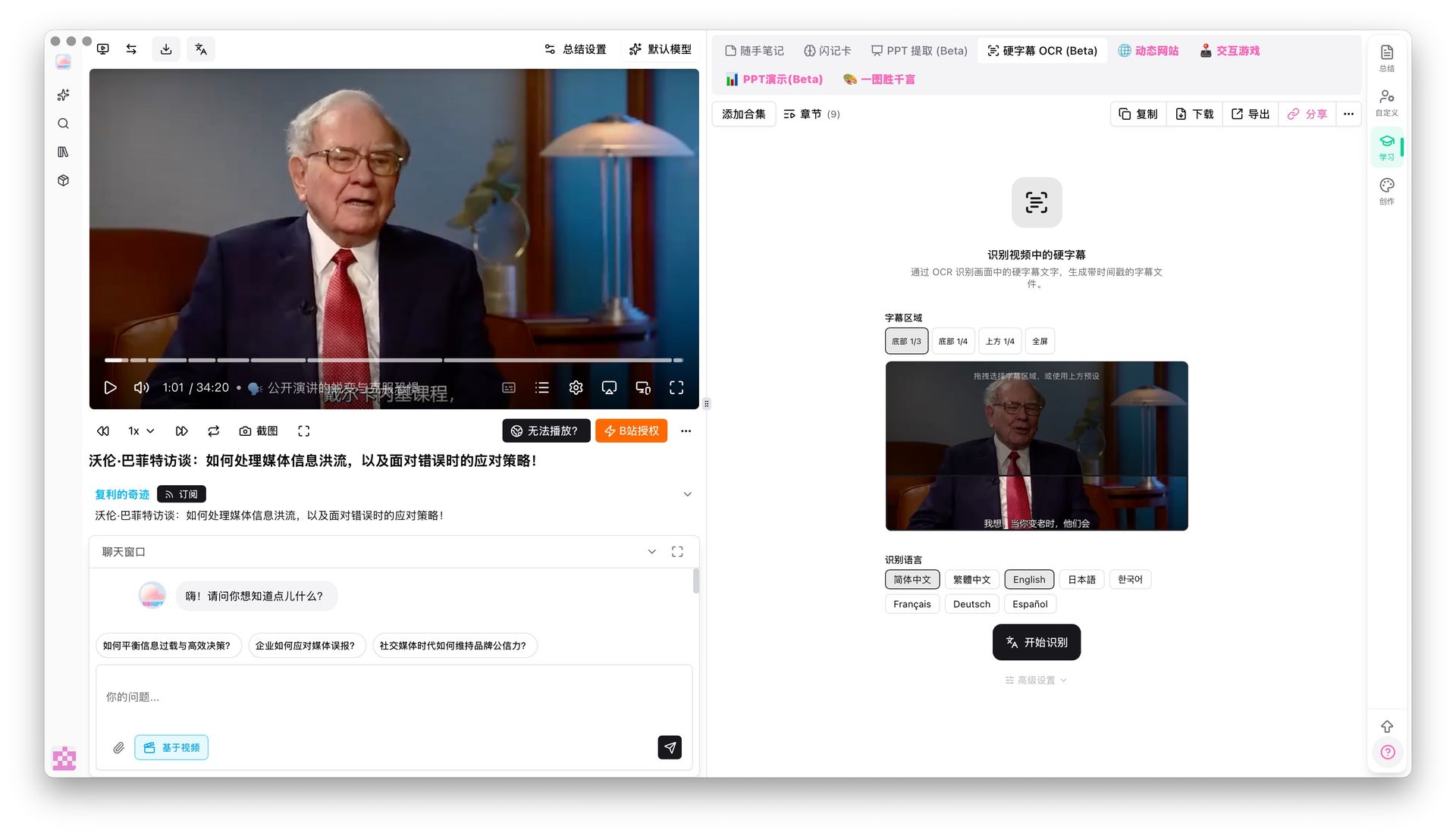 Hard-subtitle OCR entry
2. DownSub
Positioning: A pure subtitle downloader, closest in spirit to YouSubtitles.
- ✅ Free, no sign-up
- ✅ Supports YouTube, Facebook, Viki existing CC subtitles
- ✅ One-click switch between multiple language tracks
- ❌ Cannot handle videos without CC
- ❌ No support for Bilibili, Douyin, or podcast platforms
- ❌ No AI summary, no translation, no notes
- ❌ Ad-heavy, occasional subtitle encoding issues
Use it when: You only deal with YouTube CC and do not need post-processing.
3. YouSubtitles (original)
Positioning: A legacy YouTube caption downloader launched in 2014.
- ✅ Free
- ✅ Auto-generated and manual captions
- ❌ YouTube only, feature set has been frozen for years
- ❌ No translation, AI summary, or hard-subtitle OCR
- ❌ Minimal export options
Use it when: You need quick YouTube captions and do not mind a dated UI.
4. SaveSubs
Positioning: Multi-platform subtitle aggregator.
- ✅ YouTube, Vimeo, Facebook, Dailymotion
- ✅ SRT / VTT / TXT formats
- ✅ Language selector
- ❌ No ASR fallback for videos without CC
- ❌ Limited coverage for Chinese platforms
- ❌ Hits rate limits under heavy use
Use it when: You batch-download English captions across a few western platforms.
5. Subtitle Edit
Positioning: Open-source desktop subtitle editor.
- ✅ Free and open-source (Windows-first)
- ✅ Powerful editing — timing offsets, format conversion, batch replace
- ✅ Integrates Google Translate for machine translation
- ❌ Local install with a learning curve
- ❌ Does not download subtitles itself — you need another tool upstream
- ❌ Weak semantic AI
Use it when: You are a professional subtitle editor who needs deep manual control.
6. NoteGPT
Positioning: AI video summarizer that also exports captions.
- ✅ YouTube, Bilibili, TikTok support
- ✅ Subtitle export plus AI-generated notes
- ✅ Built-in translation
- ⚠️ Summaries run short, structural depth is limited
- ⚠️ No hard-subtitle OCR or serious local-file pipeline
Use it when: You want a lightweight summarizer and do not need advanced extraction.
For a wider landscape of AI video summary tools, read our 2026 best AI audio/video summary tool evaluation.
Decision table by use case
Quick answer: YouTube-only CC → DownSub/SaveSubs. Multi-platform + AI summary → BibiGPT. Professional subtitle editing → Subtitle Edit.
| Scenario | Pick | Why |
|---|---|---|
| YouTube CC only | DownSub / SaveSubs | Free, fast, zero setup |
| Bilibili / Douyin / Xiaohongshu | BibiGPT | Best coverage of Chinese platforms |
| Videos without captions (lectures, livestreams) | BibiGPT | Built-in premium ASR |
| Hard subtitles burned in frame | BibiGPT (OCR) | Exclusive feature |
| Batch transcription of local files | BibiGPT | Drag-and-drop + folder watch |
| Cross-language subtitle translation | BibiGPT | Line-by-line with preserved timestamps |
| Deep editing of existing SRTs | Subtitle Edit | Professional editor |
| Subtitles + AI structured notes | BibiGPT | One-stop pipeline |
| YouTube English summary | NoteGPT | Works for light needs |
Why BibiGPT stands out
Quick answer: YouSubtitles treats subtitle download as the goal. BibiGPT treats it as the starting point — once you have the captions, translation, summarization, notes export, and even a video-to-article conversion happen in the same interface, saving five copy-paste round-trips.
BibiGPT is trusted by over 1 million users and has generated over 5 million AI summaries. Four exclusive capabilities differentiate it from classic YouSubtitles alternatives:
1. Hard-subtitle OCR
Many interviews and online courses burn captions straight onto the video. Traditional tools must rely on ASR, which fails with strong accents or noise. BibiGPT reads the on-screen text directly (Chinese, English, Japanese, French, German, Spanish).
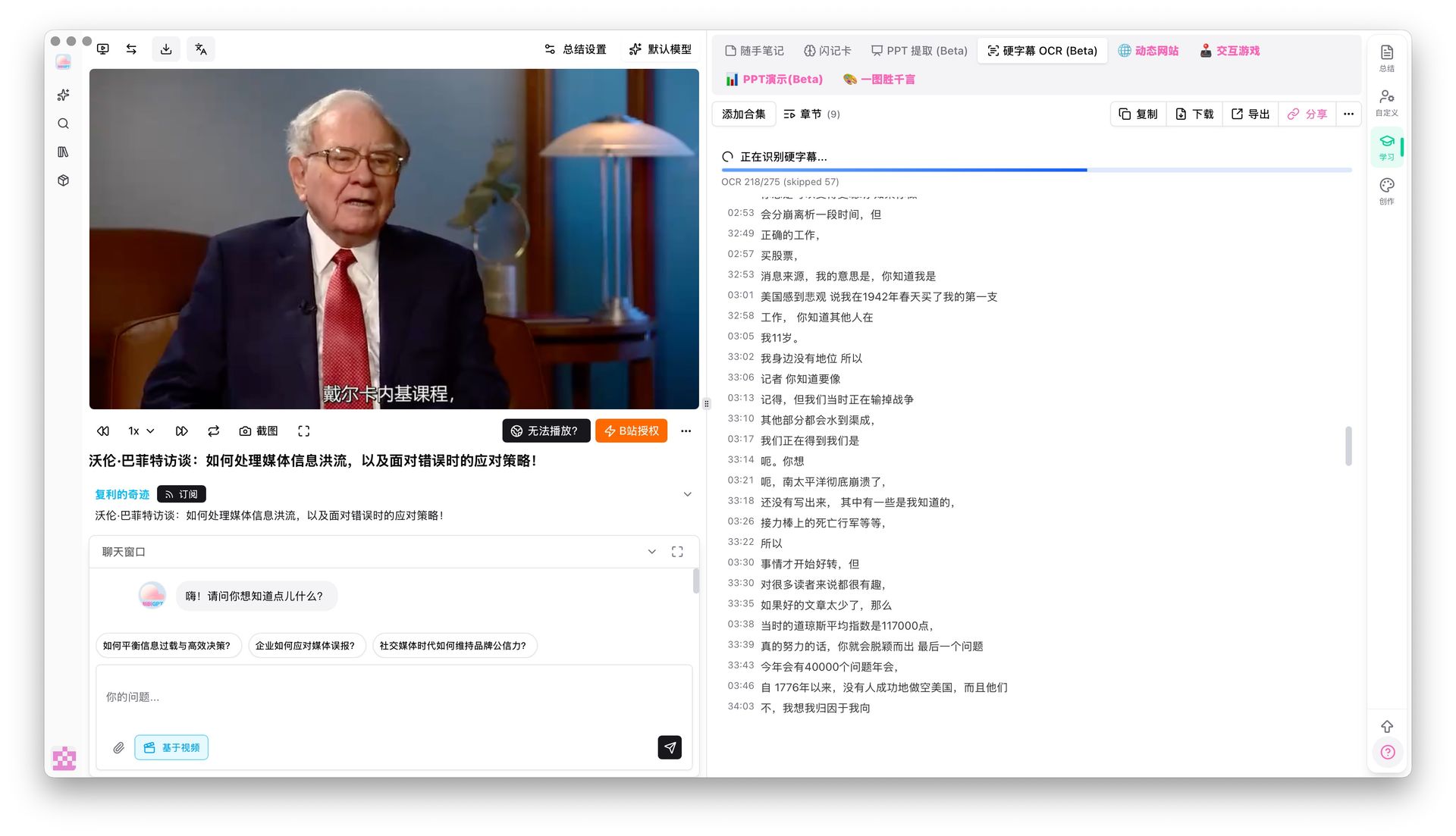 Hard-subtitle OCR result
2. Smart subtitle segmentation
Raw captions tend to be over-fragmented. BibiGPT merges 174 short lines into 38 readable sentences with live preview, using presets like "short / long / CJK-optimized". This matters for downstream translation — coherent sentences translate much better than chopped fragments.
3. Line-by-line translation with preserved timestamps
The most common mistake is dumping the whole transcript into a translator and losing time codes. BibiGPT translates line by line, keeps every timestamp, and outputs a bilingual SRT. Pair it with the FFmpeg commands in our AI subtitle translation + bilingual burn-in workflow for a full pipeline.
4. From subtitles to structured notes and articles
YouSubtitles ends at a file; BibiGPT continues into chapter-structured summaries, mind maps, and even AI-written image-rich articles — see AI video to article.
看看 BibiGPT 的 AI 总结效果

Let's build GPT: from scratch, in code, spelled out
Andrej Karpathy walks through building a tiny GPT in PyTorch — tokenizer, attention, transformer block, training loop.
FAQ
Q1: What is the key difference between YouSubtitles and BibiGPT? A: YouSubtitles is a single-purpose YouTube caption downloader. BibiGPT supports 30+ platforms, handles videos without CC via ASR, reads hard subtitles with OCR, translates line by line, and produces structured AI summaries.
Q2: How accurate is BibiGPT subtitle extraction? A: When a platform provides CC, BibiGPT reuses the original track so accuracy matches the source. For ASR-based videos, users can switch to ElevenLabs Scribe for premium accuracy.
Q3: Which YouSubtitles alternatives are fully free? A: DownSub, SaveSubs, Subtitle Edit, and the original YouSubtitles are free. BibiGPT offers a free tier; advanced capabilities such as hard-subtitle OCR and video-to-article require a Pro plan.
Q4: Can I extract YouTube subtitles without signing up? A: DownSub and SaveSubs need no account. BibiGPT allows guest trials for basic extraction but requires sign-up for translation, summaries, and note sync.
Q5: What is hard-subtitle OCR? A: Hard subtitles are burned into the video frame. Regular downloaders cannot fetch them. BibiGPT uses OCR to read them directly from the image, ideal for interviews and courses without a separate subtitle track.
Wrap-up
YouSubtitles did its job — it proved YouTube captions should be downloadable in one click. But content today lives far beyond YouTube: Bilibili, podcasts, local recordings, and hard-subtitled interviews all need a unified solution.
If you only need an occasional YouTube CC grab, DownSub stays handy. But if your workflow touches multiple platforms, missing-caption videos, translation burn-in, or any AI post-processing, BibiGPT is the most complete YouSubtitles alternative right now.
Try it:
- 🎬 Visit aitodo.co — paste any link to get subtitles plus AI summary
- 📥 Download the BibiGPT desktop client for batch local processing
- 💡 Use video subtitle translation for cross-language localization
BibiGPT Team