
Microsoft Copilot vs BibiGPT: AI Video Summary Comparison for YouTube & Bilibili (2026)
Can Microsoft Copilot summarize Bilibili videos? We compare Copilot vs BibiGPT across YouTube, Bilibili, and podcasts — 7-dimension scoring, pricing, and which tool wins for Chinese content creators.
Microsoft Copilot vs BibiGPT: AI Video Summary Comparison for YouTube & Bilibili (2026)
Table of Contents
- Quick Verdict
- Microsoft Copilot's AI Video Summary Capabilities
- BibiGPT: Multi-Platform AI Video Summary for Chinese Content
- 7-Dimension Feature Comparison
- Who Should Choose Which Tool
- Developer & AI Agent Comparison
- FAQ
Can Microsoft Copilot summarize Bilibili, Douyin, or other Chinese video platforms? No — Copilot's video summary is limited to YouTube (via Edge) and Teams meeting recordings. For users who need to process content across Bilibili, YouTube, podcasts, and more, BibiGPT offers 30+ platform support with native multilingual output.
In 2026, Microsoft has significantly invested in AI speech and vision capabilities (Azure AI Speech SDK updates, Phi-series multimodal models), boosting Copilot's video processing accuracy. This article compares both tools across practical use cases to help you make the right choice.
One-line verdict:
- Choose Copilot if: you're primarily watching English YouTube, you're an M365 enterprise user, or Teams meeting summaries are your main use case
- Choose BibiGPT if: you consume Bilibili/Douyin/Xiaohongshu content, you're a Chinese content creator, or you need AI Agent integration
Quick Verdict
| Feature | Microsoft Copilot | BibiGPT |
|---|---|---|
| YouTube Summary | ✅ Supported (Edge browser) | ✅ Supported |
| Bilibili / Douyin / Xiaohongshu | ❌ Not supported | ✅ 30+ platforms |
| Chinese content quality | ⚠️ Inconsistent | ✅ Native Chinese-first |
| Podcasts / Audio | ⚠️ Teams recording only | ✅ Xiaoyuzhou, Himalaya, etc. |
| Mind Map | ❌ | ✅ Built-in Markmap |
| AI Q&A with timestamps | ✅ Copilot Chat | ✅ Source-traced timestamps |
| Agent integration | ⚠️ Graph API (complex) | ✅ bibigpt-skill one-line install |
| Free tier | ⚠️ Limited (M365 required) | ✅ Free core features |
试试粘贴你的视频链接
支持 YouTube、B站、抖音、小红书等 30+ 平台
Microsoft Copilot's AI Video Summary Capabilities
Core answer: Microsoft Copilot can summarize YouTube videos directly in Edge's sidebar and process meeting recordings in M365 Teams. As of April 2026, Copilot does not support Chinese video platforms (Bilibili, Douyin, Xiaohongshu) and is primarily optimized for English content.
Microsoft has significantly upgraded its AI speech and vision foundations in 2025-2026, including Azure AI Speech SDK for real-time transcription and multimodal language models. These advances have improved Copilot's video summary accuracy. However, limitations around platform coverage and Chinese content remain significant.
Three main Copilot video use cases:
- Edge Sidebar: Open a YouTube video in Edge, and Copilot in the sidebar can generate a summary and answer follow-up questions in real time. No extra setup needed.
- Teams Meetings: M365 Business and above users can receive Copilot-generated meeting summaries, key points, and action items after Teams meetings — ideal for enterprise workflows.
- Microsoft Stream: Enterprise videos stored in Stream support Copilot subtitles and summaries, working best in combination with SharePoint.
Key limitations:
- No Chinese platform support: Bilibili, Douyin, Xiaohongshu, iQiyi, and other major Chinese platforms are not supported
- Inconsistent Chinese output: When summarizing Chinese-language content, the output language occasionally switches to English
- High pricing barrier: Advanced features (Teams Copilot) require a separate M365 Copilot add-on license at enterprise pricing
- Weaker mobile experience: Desktop Edge Copilot significantly outperforms the mobile app for video summary tasks
BibiGPT: Multi-Platform AI Video Summary for Chinese Content
Core answer: BibiGPT supports 30+ audio/video platforms (YouTube, Bilibili, Douyin, TikTok, Xiaohongshu, Xiaoyuzhou podcast, and more), trusted by over 1 million users with over 5 million AI summaries generated. It's the most comprehensive AI video summary tool for Chinese content ecosystems.
BibiGPT's key advantage is deep integration with Chinese platforms: rather than simply translating content, it understands Bilibili's danmaku culture, Xiaohongshu's content structure, and Douyin's short-form pacing to generate summaries that feel native to Chinese users.
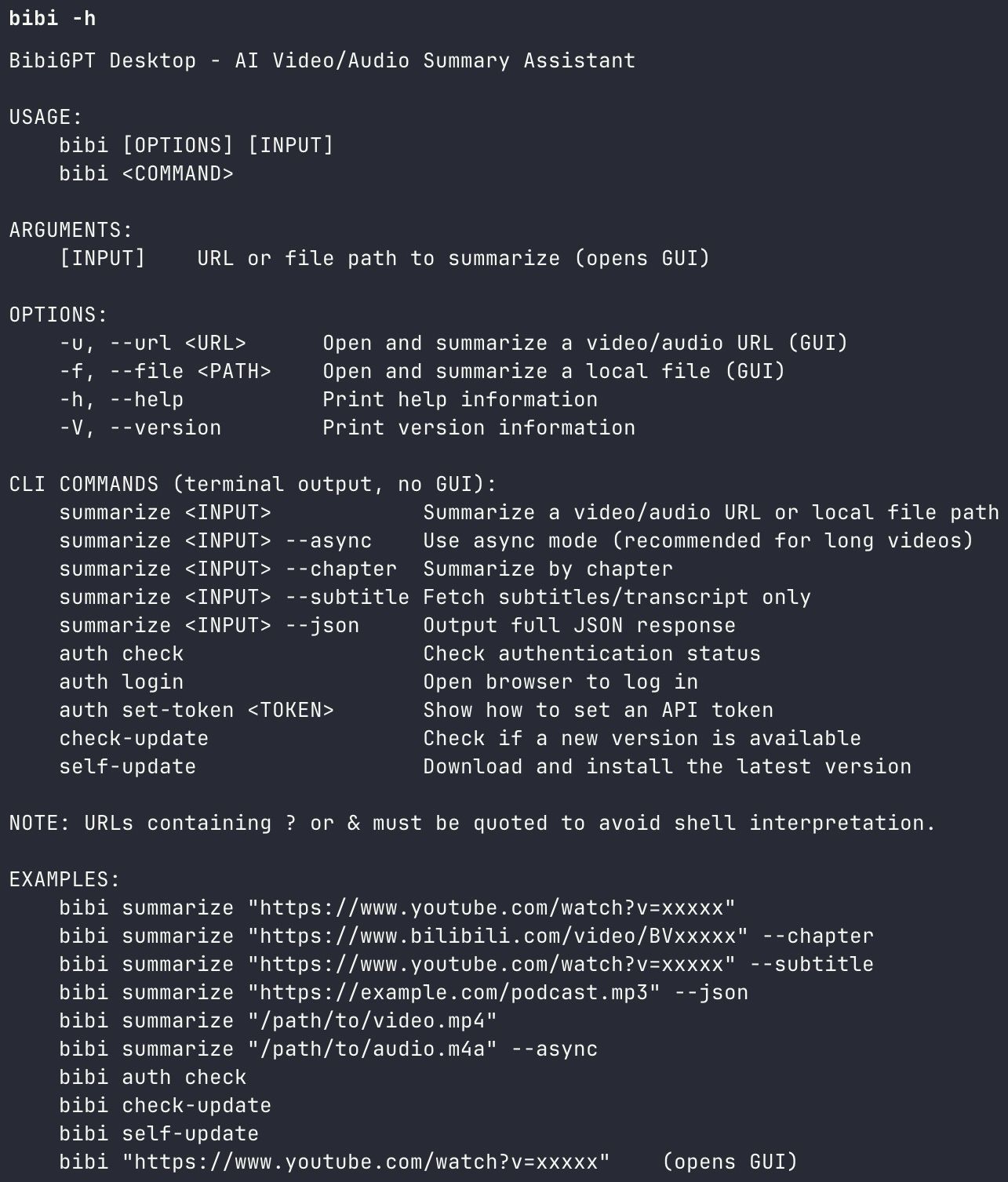 BibiGPT Agent Skill - bibi CLI tool
BibiGPT core features:
- Multi-platform AI Video Summary: Paste a URL from any of 30+ platforms — YouTube, Bilibili, TikTok, Xiaohongshu, podcast platforms — and get a structured, timestamped summary in seconds
- Bilibili-Specific AI Summary: Optimized for Bilibili subtitles and danmaku, with support for premium member videos (authorization required)
- AI Video Chat with Source Tracing: Ask questions about any video; each answer includes clickable timestamps linking back to the exact video moment
- Mind Map Generation: Automatically converts video knowledge into interactive Markmap mind maps, with export support
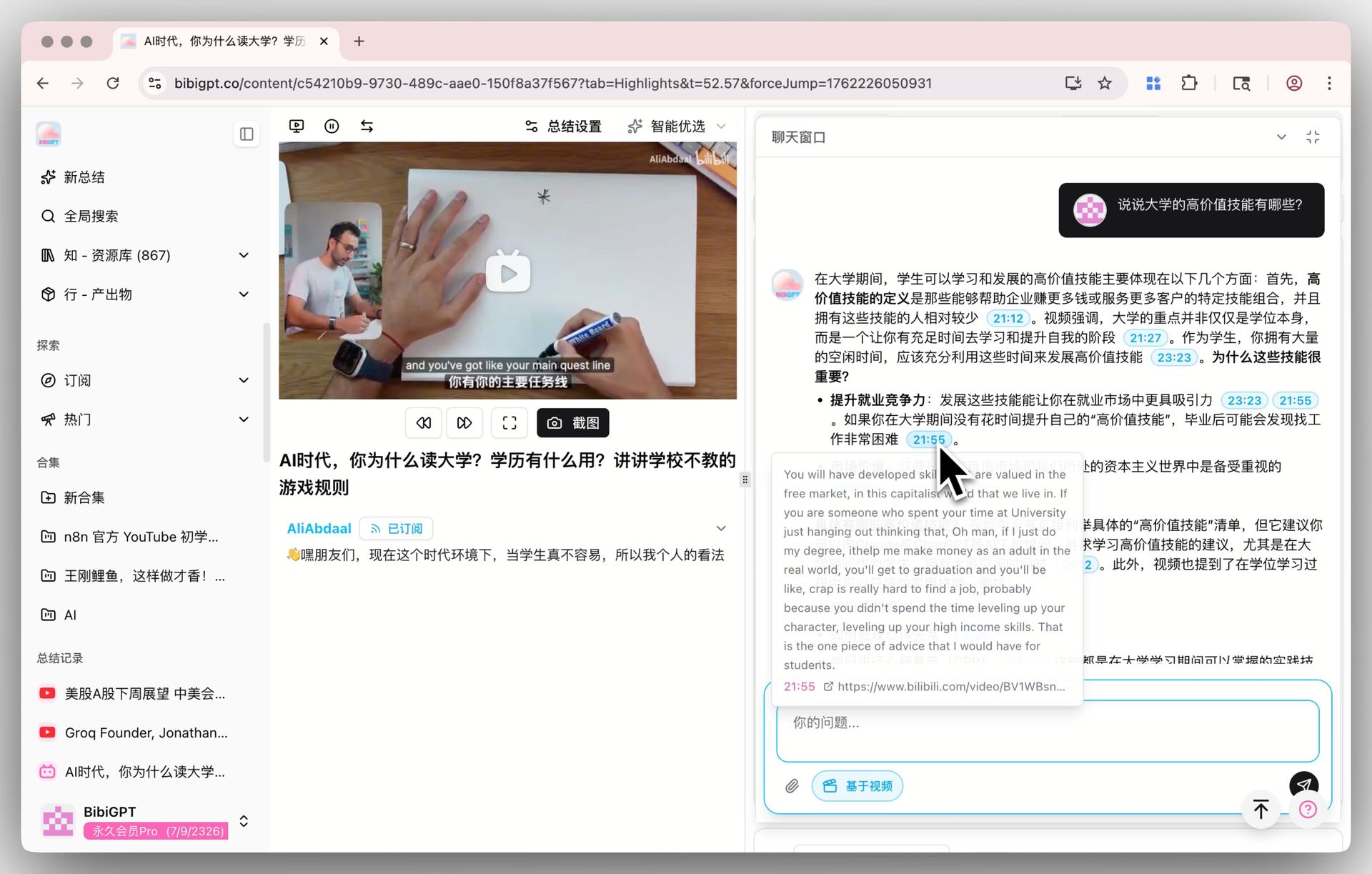 BibiGPT AI Video Chat with Source Tracing
BibiGPT bibigpt-skill (2026 Agent highlight):
The bibi CLI tool ships with BibiGPT desktop, enabling Claude Code and OpenClaw AI agents to call it directly:
# Install the skill in one line
npx skills add JimmyLv/bibigpt-skill

# Summarize any platform video
bibi summarize https://www.youtube.com/watch?v=xxx --chapter --json
看看 BibiGPT 的 AI 总结效果

Let's build GPT: from scratch, in code, spelled out
Andrej Karpathy walks through building a tiny GPT in PyTorch — tokenizer, attention, transformer block, training loop.
7-Dimension Feature Comparison
We evaluated both tools across 7 key dimensions (score out of 10):
| Dimension | Microsoft Copilot | BibiGPT | Notes |
|---|---|---|---|
| Platform coverage | 3 | 10 | Copilot: YouTube + Teams only; BibiGPT: 30+ platforms |
| Chinese content quality | 5 | 9 | Copilot output occasionally switches language; BibiGPT Chinese-native |
| Summary accuracy | 8 | 9 | Both use top-tier models; BibiGPT allows model switching |
| Free availability | 4 | 8 | Copilot advanced features require M365 license |
| Mobile experience | 5 | 8 | BibiGPT has dedicated iOS/Android apps |
| AI Agent integration | 6 | 9 | Copilot: Graph API (complex); BibiGPT: bibigpt-skill one-liner |
| Knowledge management | 5 | 9 | BibiGPT natively exports to Notion, Obsidian, Readwise |
Overall score: Copilot 5.7 / BibiGPT 9.1
Evaluation methodology: Scores are based on BibiGPT team hands-on testing using identical test content (English/Chinese YouTube videos, Bilibili videos, podcasts), as of April 2026.
Who Should Choose Which Tool
Choose Microsoft Copilot if:
- Your workflow is centered in Microsoft 365 (Teams, Outlook, Word)
- Meeting recording summaries are your core use case and you already have an M365 account
- You primarily consume English YouTube content and need occasional summaries
Choose BibiGPT if:
- You follow Bilibili, YouTube, podcasts, Xiaohongshu across multiple platforms
- You want to build a knowledge base by exporting video insights to Notion or Obsidian
- You're a content creator who wants to repurpose video content into articles or notes
- You want to set up an AI workflow connecting Bilibili to a Notion knowledge base
Developer & AI Agent Comparison
The biggest 2026 divide is in ease of Agent integration:
Microsoft Graph API:
- Requires Azure subscription, enterprise accounts, and complex OAuth flows
- Video-related APIs are scattered across Teams API and Stream API documentation
- Best for enterprise dev teams already deeply embedded in the Microsoft ecosystem
BibiGPT bibigpt-skill:
- The
bibicommand becomes available automatically after installing BibiGPT desktop - Supports
--chapter(chapter summary),--json(structured output),--async(async processing for long videos) - Works natively with Claude Code, OpenClaw, and other popular AI agent platforms
- No separate API key application required — works out of the box
For more on Agent integration patterns, see: Best YouTube AI Summarizer Chrome Extensions
FAQ
Q1: Can Microsoft Copilot summarize Bilibili videos?
A: As of April 2026, Microsoft Copilot does not support Bilibili video summaries. Copilot's video summary feature mainly covers YouTube (via Edge browser) and Teams meeting recordings. For Chinese video platforms, a dedicated tool like BibiGPT is required.
Q2: Which tool produces better summaries?
A: For English YouTube content, both tools perform comparably in quality. For Chinese Bilibili, Douyin, and Xiaohongshu content, BibiGPT's specialized optimization produces noticeably higher-quality results. Across multi-platform use cases, BibiGPT leads comprehensively for Chinese content.
Q3: What does BibiGPT cost?
A: BibiGPT offers a free tier that includes core video summary features. Paid Plus/Pro plans unlock higher frequency, more model options, and advanced features like the Agent skill. See aitodo.co for current pricing.
Q4: Can I use both tools together?
A: Yes, they complement each other well. Recommended workflow: Use Copilot for enterprise Teams meetings (if you already have M365) → Use BibiGPT for personal learning across Bilibili/YouTube → Export BibiGPT highlight notes to Notion for unified knowledge management.
Start your AI efficient learning journey now:
- 🌐 Official Website: https://aitodo.co
- 📱 Mobile Download: https://aitodo.co/app
- 💻 Desktop Download: https://aitodo.co/download/desktop
- ✨ Learn More Features: https://aitodo.co/features
BibiGPT Team