
AI Wearable Notetaker + Meeting Transcription Workflow 2026: Plaud, Taya, Omi, Viaim Compared + BibiGPT
The 2026 buyer's guide to AI wearable recording devices: Plaud NotePin S, Taya Necklace, Omi, and Viaim compared side by side. Plus the complete record-to-transcribe-to-AI-summary workflow using BibiGPT for meeting audio processing.
AI Wearable Notetaker + Meeting Transcription Workflow 2026: Plaud, Taya, Omi, Viaim Compared + BibiGPT
You recorded the meeting, but you never listened back. That single sentence describes the experience of millions of knowledge workers in 2026. You spend an hour in a meeting, another 30 minutes cobbling together notes, and still miss the key decisions. AI wearable notetakers have changed the act of recording itself — and BibiGPT changes everything that happens after: from a raw audio file to structured, searchable meeting minutes in 30 seconds.
AI 章節摘要預覽

Bilibili: GPT-4 & Workflow Revolution
A deep-dive explainer on how GPT-4 transforms work, covering model internals, training stages, and the societal shift ahead.
Table of Contents
- You Record But Never Replay: What Do You Actually Need?
- 2026 AI Wearable Notetaker Comparison: Plaud vs Taya vs Omi vs Viaim
- The Complete Workflow: Record → Export → AI Summarize with BibiGPT
- Three Core BibiGPT Features for Meeting Audio
- Advanced Tips for a More Efficient Meeting Recording Pipeline
- FAQ
- Conclusion: From "Recorded but Forgotten" to "Recorded and Ready"
You Record But Never Replay: What Do You Actually Need?
Direct answer: Most people record meetings not to listen again, but to avoid missing key information. Traditional recorders solve the "capture" problem but not the "use" problem. The combination of an AI wearable recorder and an AI summarization tool is the complete meeting documentation solution.
You have probably tried some of these approaches before:
- Phone recording — inconsistent audio quality, easy to forget to start, huge file sizes, and you still have to organize notes manually
- Traditional dictaphones — yet another device to carry, and the audio still requires manual review
- Built-in meeting transcription — limited to online meetings; transcription quality varies wildly across platforms
- AI notebooks — require typing or handwriting; cannot capture full spoken conversations
The 2026 paradigm is wearable recording + AI post-processing. The device captures high-quality audio without you thinking about it; the AI turns that audio into a structured document. You need both — a good recording device ensures audio quality, and a good AI tool ensures no information is lost.
Over 1 million users already use BibiGPT to process meeting and audio content, with more than 5 million AI summaries generated to date. If you are looking for an end-to-end "record → transcribe → AI summarize" workflow, this guide is for you.
2026 AI Wearable Notetaker Comparison: Plaud vs Taya vs Omi vs Viaim
Direct answer: The four leading AI wearable notetakers in 2026 each target a different audience. Plaud NotePin S is best for formal business settings, Taya Necklace suits everyday wear and female professionals, Omi appeals to developers and tinkerers, and Viaim Nano+ is the budget-friendly entry point. Pair any of them with BibiGPT for significantly more powerful AI summarization.
Side-by-Side Comparison
| Feature | Plaud NotePin S | Taya Necklace | Omi | Viaim Nano+ |
|---|---|---|---|---|
| Price | $169+ | $129+ | $89 | ~$69 |
| Form Factor | Magnetic lapel pin / clip | Necklace pendant | Pin / lanyard | Magnetic clip |
| Battery Life | ~20 hours | ~12 hours | ~8 hours | ~16 hours |
| Storage | 64 GB | 32 GB | 16 GB | 32 GB |
| Noise Reduction | Dual-mic array | Single mic + AI denoise | Single mic | Dual-mic |
| Built-in AI | Transcription + basic summary | Transcription + basic summary | Open-source community plugins | Transcription |
| Export Formats | MP3 / WAV / M4A | MP3 / WAV | WAV / FLAC | MP3 / WAV |
| Best For | Boardrooms, formal meetings | Daily wear, client calls | Developers, hobbyists | Budget-conscious buyers |
| Standout | Best recording quality, premium build | Fashionable, invisible recording | Open-source, customizable | Best value for money |
| Weakness | Highest price | Shorter battery | Ecosystem still maturing | Basic AI features |
Buying Recommendations
For formal business settings, choose the Plaud NotePin S. Its dual-microphone array delivers the best noise reduction in crowded conference rooms, and 64 GB of storage means weeks of recordings before you need to offload. The magnetic design attaches discreetly to a suit lapel.
For everyday all-day recording, choose the Taya Necklace. The pendant form factor makes recording invisible. It is ideal for one-on-one interviews, client conversations, and spontaneous ideas throughout the day.
For developers and power users, choose the Omi. An active open-source community means custom plugins, API access, and workflow automation. If you are comfortable writing code, Omi gives you the most flexibility.
For a budget entry point, choose the Viaim Nano+. At roughly $69, it offers dual-mic noise reduction and solid audio quality — a low-risk way to try the wearable notetaker category.
Important: Every wearable notetaker's built-in AI is relatively basic — usually just transcription and a brief summary. If you need structured meeting minutes, chapter-level deep reading, multi-file merge summaries, or AI follow-up Q&A, export your recordings and process them with BibiGPT's speech-to-text feature.
The Complete Workflow: Record → Export → AI Summarize with BibiGPT
Direct answer: The full workflow has three steps: record with your wearable device → export the audio file to your phone or computer → upload to BibiGPT for AI-structured summary. The entire post-recording process takes under 5 minutes.
Step 1: Record with Your Wearable Device
Using the Plaud NotePin S as an example:
- Press the recording button on the device (or double-tap to start)
- The LED blinks to indicate active recording
- Press the button again when the meeting ends to stop recording
- Audio is saved automatically to internal storage
Recording best practices:
- Position the device close to the sound source — lapel or chest level works best
- For multi-person meetings, place the device at the center of the table if possible
- Avoid fabric rustling noise against the microphone
- Test recording quality briefly before an important meeting
Step 2: Export the Audio File
Each device has a slightly different export path:
- Plaud NotePin S — Sync via Bluetooth to the Plaud app, then export MP3/WAV to your phone or computer
- Taya Necklace — Sync via the Taya app; supports WiFi transfer to desktop
- Omi — Bluetooth to phone, export via app or API
- Viaim Nano+ — USB-C direct to computer, or Bluetooth via the companion app
You end up with a standard audio file (MP3, WAV, or M4A) ready for the next step.
Step 3: Upload to BibiGPT for AI Summary
Open BibiGPT and upload the audio file:
- Web app — Click "Upload File" and select your recording
- Desktop app — Drag and drop the file directly into the BibiGPT window
- Mobile app — Share the file from your phone's Files app to BibiGPT
BibiGPT automatically performs the following pipeline:
- Speech recognition (ASR) — Converts audio to accurate text with support for mixed-language recognition (English, Chinese, Japanese, Korean, and more)
- Intelligent segmentation — Automatically splits the transcript into chapters based on topic shifts
- AI summary generation — Outputs structured meeting minutes with key decisions, action items, and glossary terms
The whole process typically completes in 30 seconds to 2 minutes depending on audio length. Compared to 30–60 minutes of manual note-taking, that is a 10x+ efficiency gain.
If you have a batch of recordings to process, BibiGPT's local file speech-to-text feature supports uploading multiple files for parallel processing.
Three Core BibiGPT Features for Meeting Audio
Direct answer: BibiGPT goes far beyond basic speech-to-text. Three core capabilities — multi-file merged summary, chapter deep reading, and smart deep summary — turn every meeting recording into searchable, citable, actionable knowledge.
Feature 1: Multi-File Merged Summary
When you have recordings from a series of meetings — weekly stand-ups, project retrospectives, or a multi-day conference — upload them all at once. BibiGPT merges the transcripts and generates a single comprehensive summary.
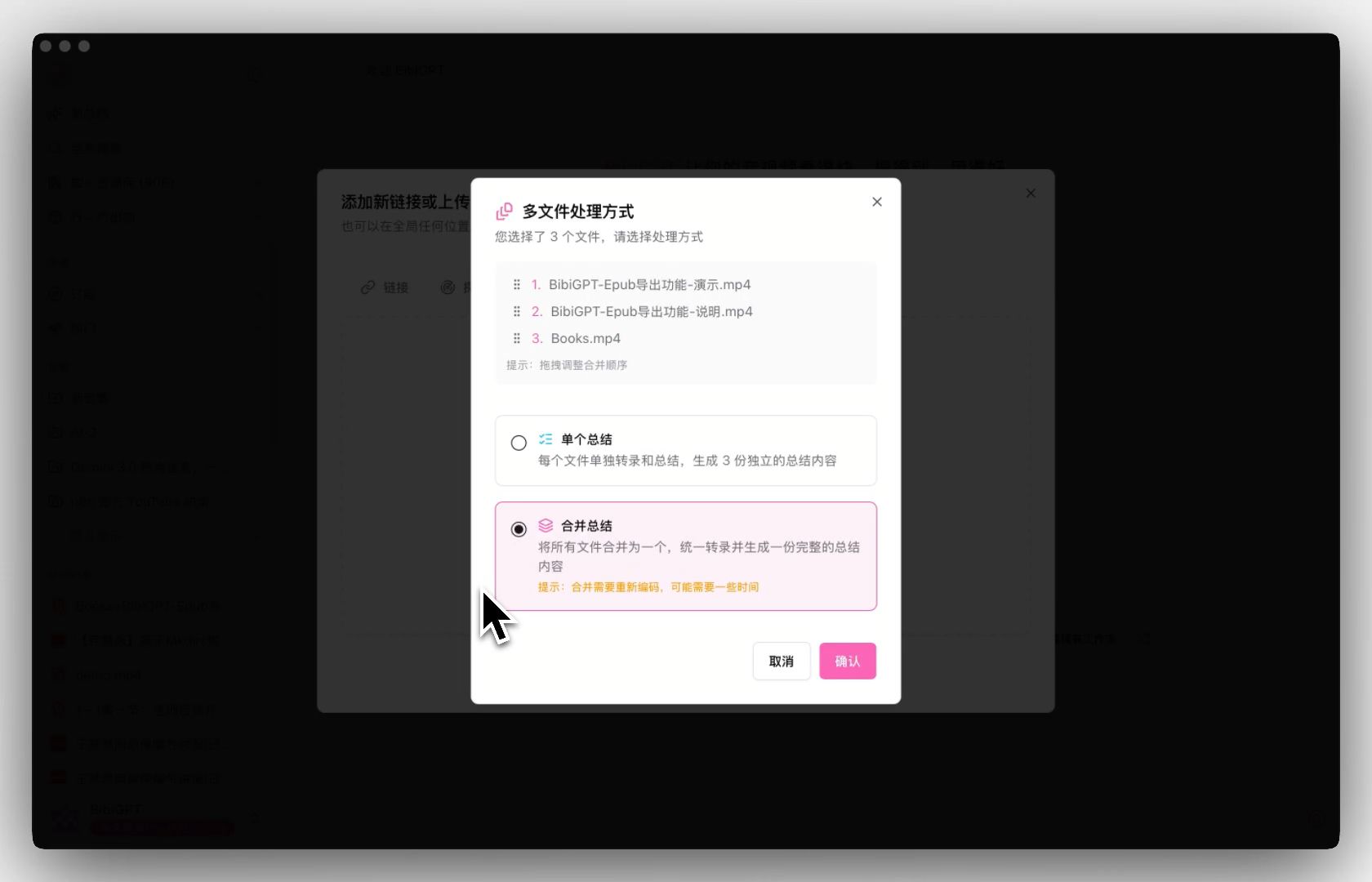 Multi-file merge dialog
Use cases:
- Three meetings in one day → one unified daily brief
- All recordings from project kickoff to close → a complete project knowledge base
- Multiple podcast episodes on a topic → rapid full-topic overview
Feature 2: Chapter Deep Reading
AI automatically segments long recordings by topic into chapters, each with its own summary. Click any chapter's timestamp to jump to the corresponding position in the audio — an immersive "read where you left off, hear what you need" experience.
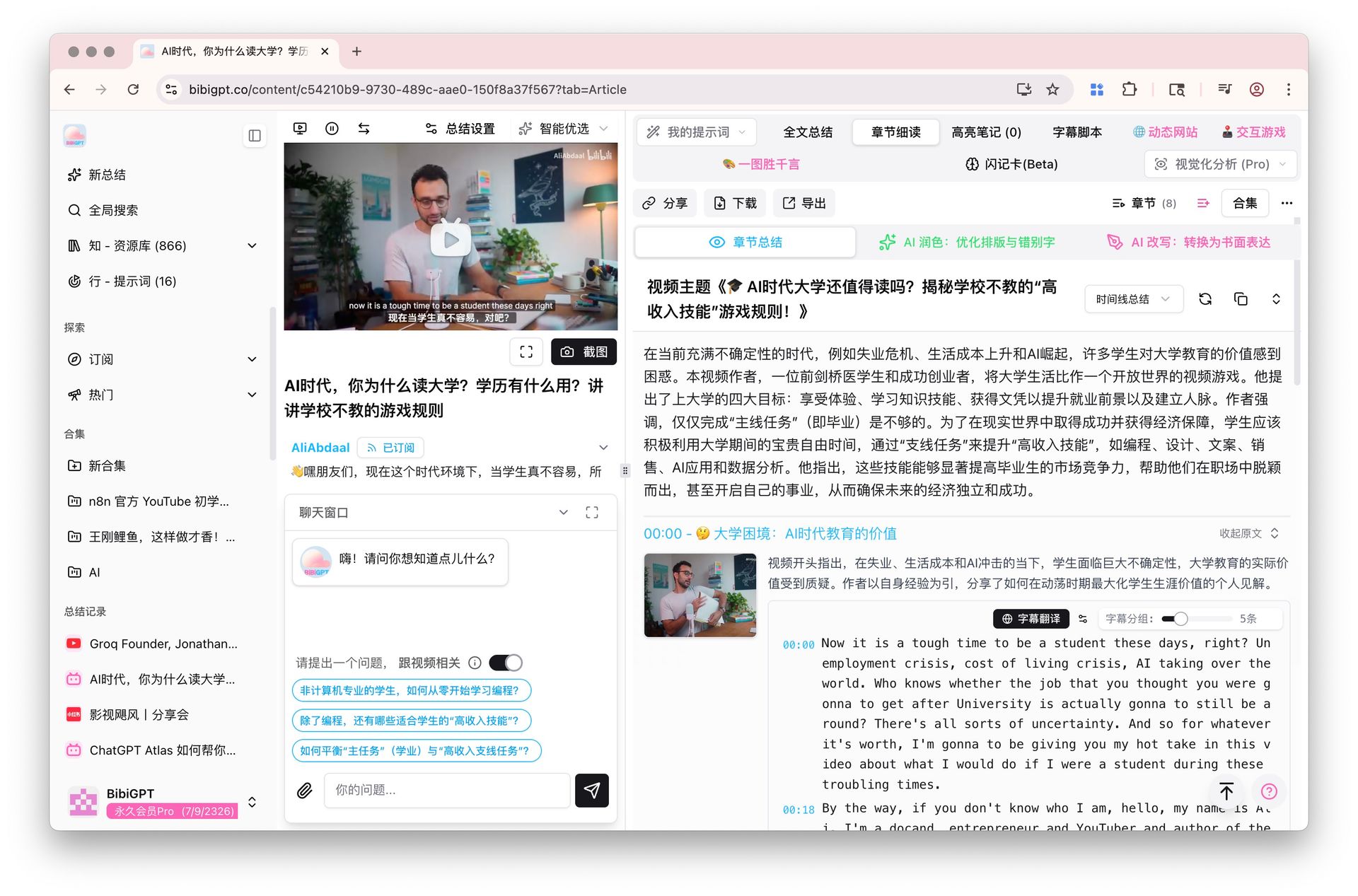 Chapter deep reading feature
Why this matters:
- In a 2-hour meeting, you may only care about 15 minutes of content
- The chapter view lets you skip directly to relevant sections instead of scrolling through the full transcript
- Clickable timestamps enable quick fact-checking against the original audio
Feature 3: Smart Deep Summary
One click produces a structured deep summary with highlights, Q&A pairs, and glossary definitions. For technical reviews, legal discussions, or financial analyses, the automatic glossary feature is especially valuable.
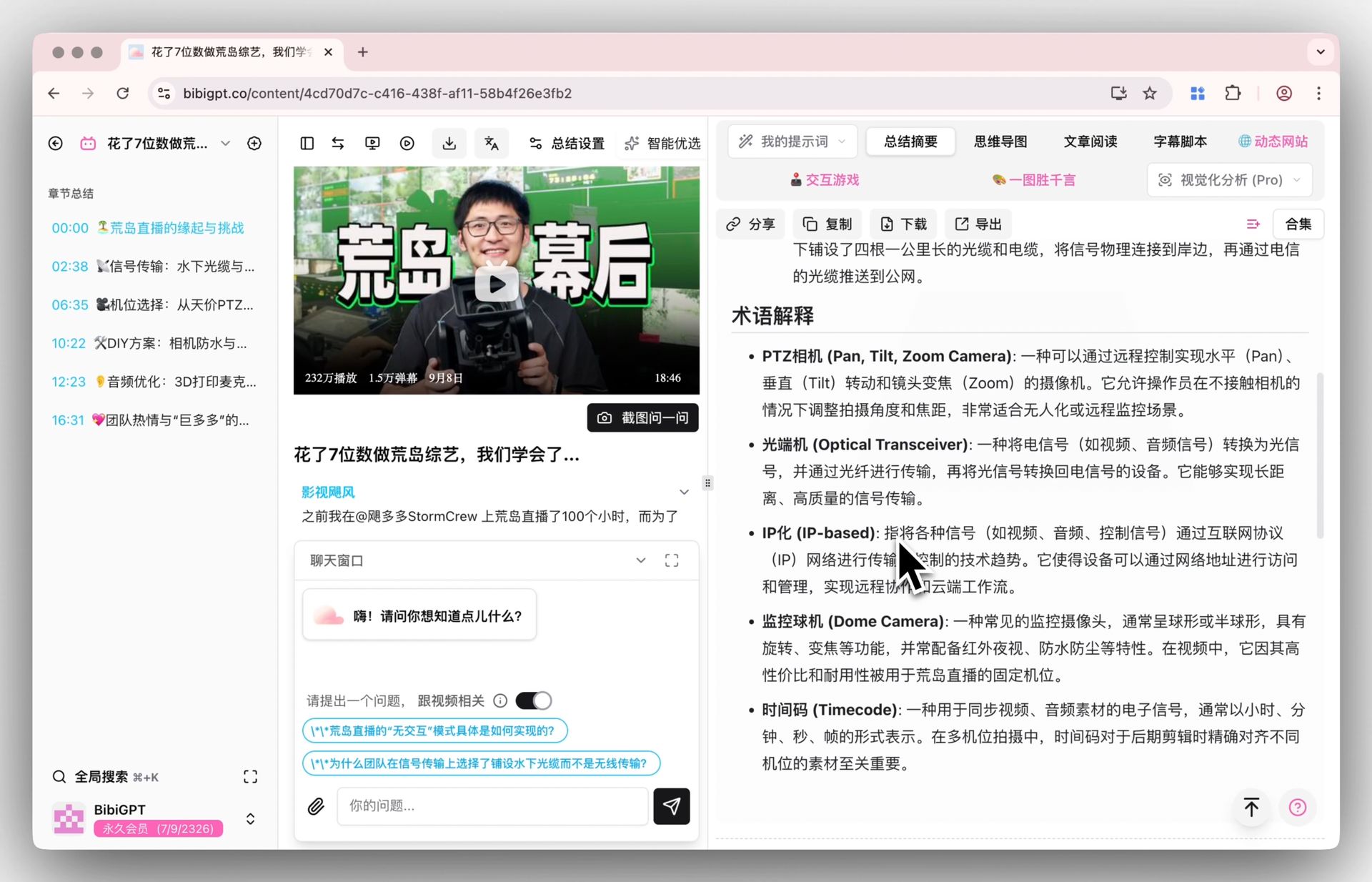 Smart deep summary with glossary
Output includes:
- Highlights — The 3–5 most important conclusions from the meeting
- Q&A — Automatically extracted question-and-answer pairs
- Glossary — Automatic definitions for domain-specific terms
- Action Items — Who is responsible for what, with deadlines
Need to export results as formal meeting minutes documents? BibiGPT supports one-click export to Notion, Obsidian, Lark, and more.
Advanced Tips for a More Efficient Meeting Recording Pipeline
Tip 1: Desktop Folder Monitoring for Auto-Import
If you use the BibiGPT desktop app, you can configure folder monitoring: designate a local folder as your "recording inbox." When new audio files from your wearable device land in that folder, BibiGPT automatically queues them for processing.
Setup steps:
- Open BibiGPT Desktop → Settings → Folder Monitoring
- Select your wearable device's sync folder (e.g., the Plaud app export directory)
- Enable "Auto-process new files"
With this setup, every meeting recording syncs to your computer and is automatically summarized — zero manual intervention required.
Tip 2: Custom Prompt Templates
Different meeting types require different summary formats. Save frequently used templates in BibiGPT:
Weekly stand-up template:
Summarize this meeting recording as a weekly stand-up report:
1. Each team member's progress update
2. Blockers encountered and proposed solutions
3. Next week's priorities
4. Cross-team coordination items
Client call template:
Summarize this client call recording, extracting:
1. Client's core requirements and concerns
2. Our proposed solutions and commitments
3. Follow-up items with timelines
4. Client sentiment assessment
Tip 3: Multilingual Meeting Auto-Translation
For mixed-language or international meetings, BibiGPT supports multilingual speech recognition and automatic translation. English and Mandarin segments within the same recording are recognized separately and translated, producing bilingual meeting minutes.
This is invaluable for global teams — hold one meeting, get meeting minutes in multiple languages automatically.
Tip 4: Integrate with Your Note-Taking Tools
BibiGPT supports one-click sync to major productivity tools:
- Notion — Creates a new page preserving chapter structure and timestamps
- Obsidian — Exports in Markdown format, ready to integrate into your knowledge vault
- Lark (Feishu) — Pushes directly to Lark Docs for team sharing
For a complete sync setup guide, see the AI meeting-to-document workflow.
FAQ
Q1: Can I upload audio files from wearable notetakers directly to BibiGPT?
A: Yes. BibiGPT supports MP3, WAV, M4A, FLAC, OGG, and all other mainstream audio formats, as well as video formats like MP4, WebM, and MOV. Files exported from any wearable notetaker require no format conversion — just upload directly. BibiGPT supports over 30 platforms and formats.
Q2: How long does BibiGPT take to process a 2-hour meeting recording?
A: Typically 1–3 minutes for both transcription and summary. BibiGPT uses advanced AI models including GPT-4, Claude, and Gemini for speech recognition and summarization, so even very long recordings are processed efficiently. You receive a notification when processing is complete, so there is no need to wait at the screen.
Q3: Can BibiGPT distinguish between multiple speakers in a meeting?
A: Yes. BibiGPT supports speaker diarization. Different speakers' contributions are labeled in the summary output, making it easy to trace who said what. Accuracy is highest for meetings with up to 5 participants. For larger groups (10+), we recommend spot-checking important statements against the original audio.
Q4: How does BibiGPT differ from the built-in AI in wearable notetakers?
A: Wearable notetakers like Plaud and Taya offer basic transcription and simple summaries. BibiGPT provides deep structured processing: chapter segmentation, multi-file merging, glossary generation, Q&A extraction, mind maps, AI follow-up chat, and integrations with Notion, Obsidian, and Lark. The two are complementary — the device captures high-quality audio, and BibiGPT handles deep comprehension and knowledge output.
Q5: What features are available on the free plan?
A: The free tier includes audio upload, basic transcription, and basic AI summary. For multi-file merging, deep summaries, batch processing, and folder monitoring, upgrade to the Plus or Pro plan. See the best AI meeting transcription tools comparison for a detailed feature breakdown.
Q6: Is my meeting audio kept private?
A: BibiGPT processes audio on secure servers and does not share your recordings with third parties. Audio files can be deleted from your account at any time. For enterprises with strict compliance requirements, contact the team for dedicated deployment options.
Conclusion: From "Recorded but Forgotten" to "Recorded and Ready"
AI wearable notetakers solve the problem of high-quality, always-on recording. BibiGPT solves the problem of what happens after you hit stop. Together, they form the most practical meeting documentation workflow of 2026:
- Invisible recording — Wearable devices make recording a natural act, no conscious effort required
- Automated processing — Folder monitoring + auto-processing means summaries appear as soon as recordings sync
- Structured output — Not just a wall of text, but chapter-segmented, decision-extracted, action-item-tagged knowledge documents
- Reusable knowledge — Sync to Notion or Obsidian so every meeting's value compounds over time
Trusted by over 1 million users with more than 5 million AI summaries generated, BibiGPT is helping knowledge workers, entrepreneurs, and podcast listeners worldwide turn meetings from time cost into knowledge capital.
Try it now: upload your most recent wearable recording to BibiGPT and see what AI can produce in under a minute.
Start your AI-powered meeting workflow now:
- 🌐 Official Website: https://aitodo.co
- 📱 Mobile Download: https://aitodo.co/app
- 💻 Desktop Download: https://aitodo.co/download/desktop
- ✨ Learn More Features: https://aitodo.co/features
BibiGPT Team