
NotebookLM Deep Research Complete Guide 2026: Cinematic Video Overviews and AI Video Knowledge Management
Master NotebookLM Deep Research and Cinematic Video Overviews with this complete 2026 guide. Learn how to combine Google's AI research tool with BibiGPT's video summarization for a powerful knowledge management workflow.
NotebookLM Deep Research Complete Guide 2026: Cinematic Video Overviews and AI Video Knowledge Management
Table of Contents
- What Is NotebookLM Deep Research? Core Capabilities Explained
- Cinematic Video Overviews: Turning Your Notes Into Documentaries
- NotebookLM Deep Research Tutorial: Getting Started Step by Step
- Designing a Knowledge Management Workflow with NotebookLM
- How BibiGPT Fills NotebookLM's Audio-Video Gap
- Deep Research + AI Video Summary: Building a Knowledge Loop
- Advanced Tips: Making NotebookLM and BibiGPT Work Together
- FAQ
What Is NotebookLM Deep Research? Core Capabilities Explained
NotebookLM Deep Research is Google's breakthrough feature released in 2026 that automatically performs multi-step deep analysis based on your uploaded source documents, generating fully cited research reports. This is not a simple chatbot — it functions like a dedicated research assistant that decomposes complex questions, cross-references information across documents, traces citation sources, and produces logically structured analytical reports.
BibiGPT の AI 要約をご覧ください

Bilibili: GPT-4 & Workflow Revolution
A deep-dive explainer on how GPT-4 transforms work, covering model internals, training stages, and the societal shift ahead.
In 2026, knowledge workers face a fundamental challenge: not a lack of information, but an inability to efficiently digest and connect information across sources. NotebookLM addresses this by focusing exclusively on materials you upload — PDFs, web pages, YouTube videos, audio files — rather than searching the open web.
The core logic of Deep Research is straightforward: give it a research question, and it will automatically execute multi-step reasoning within your document library. Upload 10 papers on AI in education and ask "What are the core impacts of AI on K-12 education?", and it will not simply extract conclusions from one paper. Instead, it cross-compares perspectives from all papers, identifies areas of consensus and disagreement, and traces every argument back to its original source.
This is transformative for academic research, market analysis, and product strategy. Combined with NotebookLM's existing Audio Overviews (podcast-style summaries) and the new Cinematic Video Overviews, you can complete the entire pipeline — upload materials, conduct deep research, and create visual presentations — within a single tool.
However, NotebookLM has a clear capability boundary: it only processes documents you upload. If your knowledge sources include YouTube tutorials, Bilibili lectures, podcasts, or other audio-video content, you need to first convert these into formats NotebookLM can process. This is exactly where BibiGPT's AI video summary capability comes in — more on this shortly.
Cinematic Video Overviews: Turning Your Notes Into Documentaries
Cinematic Video Overviews is the most exciting new NotebookLM feature of 2026. It automatically transforms your uploaded documents into an immersive short video complete with narration, visuals, and subtitles — resembling a Netflix-style documentary segment. This feature marks a significant leap in AI knowledge presentation, moving from pure text to rich multimodal output.
How It Works
Cinematic Video Overviews executes three core steps behind the scenes:
- Content Analysis and Script Generation: AI extracts the core narrative arc from your source documents and generates a video script
- Visual Asset Matching: Advanced AI models generate visual materials that match the content — charts, diagrams, key data visualizations
- Narration Synthesis and Editing: AI voice synthesis produces natural-sounding narration while automatically handling editing and layout
Best Use Cases
- Academic Presentations: Convert research findings into shareable video summaries for conferences or lab meetings
- Internal Training: Transform product documentation and SOPs into employee training videos
- Content Creation: Rapidly turn deep research into script foundations for YouTube or social media videos
- Knowledge Sharing: Efficiently communicate complex findings to your team in video format
How It Differs from Audio Overviews
If Audio Overviews is "two AI hosts discussing your materials over a podcast," then Cinematic Video Overviews is "presenting your research through documentary filmmaking." The former is ideal for commute-time passive listening; the latter is better for scenarios requiring visual aids and deeper comprehension.
Note that Cinematic Video Overviews typically generates videos between 3 and 8 minutes long, optimized for social media sharing and quick briefings. If you need to process existing long-form video content — such as a 2-hour YouTube lecture — you will need BibiGPT's AI video summarization to handle that task.
NotebookLM Deep Research Tutorial: Getting Started Step by Step
Deep Research has a low barrier to entry, but unlocking its full potential requires some technique. This step-by-step walkthrough covers everything from creating your first notebook to receiving a comprehensive research report, helping you get started quickly while avoiding common pitfalls.
Step 1: Create a Notebook and Upload Source Documents
Log into NotebookLM and create a new notebook. You can upload the following types of source documents:
- PDF files (papers, reports, ebooks)
- Google Docs documents
- Web page URLs (automatically extracts body text)
- YouTube videos (extracts subtitles as a text source)
- Audio files (automatically transcribed to text)
- Copy-pasted plain text
Pro tip: Aim for 5 to 15 related source documents per notebook. Too few limits research depth; too many can introduce noise. Organize your sources around a single clear research theme.
Step 2: Formulate Your Research Question
Enter your research question in the Deep Research panel. Effective research questions should be:
- Specific but not too narrow: "How is AI transforming content creators' workflows?" is better than "What is the impact of AI on society?"
- Suited for cross-document analysis: The answer should require synthesizing multiple sources
- Dimensioned with clear analytical angles: "Compare different papers' methodologies and conclusions on remote work productivity" triggers deeper analysis than "Is remote work good?"
Step 3: Review the Research Plan
Deep Research first generates a Research Plan, outlining how it intends to decompose your question and which information it will extract from which source documents. You can adjust direction at this stage to prevent the AI from going off-track.
Step 4: Receive Your Research Report
Once you confirm the plan, the AI executes multiple rounds of analysis. The final report includes:
- Structured research conclusions with clear logical flow
- Citation sources for every argument (clickable links to original documents)
- Cross-document perspective comparisons highlighting agreement and divergence
- Knowledge gaps and contradictions the AI identified in your source materials
 Smart Deep Summary
Designing a Knowledge Management Workflow with NotebookLM
NotebookLM's greatest strength is not any single feature — it is the complete pipeline it builds from raw material input to multi-format knowledge output. Understanding this pipeline design is essential for truly leveraging Deep Research and Cinematic Video capabilities.
Input Layer: Multi-Format Source Document Aggregation
NotebookLM supports PDFs, Google Docs, web pages, YouTube videos, and audio files as inputs. The key principle is that all subsequent analysis is grounded in documents you personally selected, ensuring research controllability and citation traceability — this is the fundamental difference from general-purpose AI chat tools.
Processing Layer: Three Depth Modes
- Conversational Mode: Ask direct questions and receive instant answers grounded in your source documents
- Deep Research Mode: Submit complex research questions; the AI automatically executes multi-step reasoning and outputs structured reports
- Note Organization Mode: AI helps extract key information from source documents and organizes it into structured notes
Output Layer: Three Knowledge Presentation Formats
- Text Reports: Structured research reports from Deep Research
- Audio Overviews: AI dual-host podcast-style summaries for on-the-go learning
- Cinematic Video Overviews: Documentary-style video summaries for visual understanding and sharing
This "multi-format input, multi-mode processing, multi-format output" design is elegant. But its weakness is also clear: the input layer depends on you manually uploading documents. If your knowledge sources are scattered across various audio-video platforms, the manual work of downloading, transcribing, and uploading becomes substantial.
How BibiGPT Fills NotebookLM's Audio-Video Gap
While NotebookLM supports YouTube videos and audio uploads, its audio-video processing has notable limitations. BibiGPT, the leading AI audio-video assistant with over 1 million active users, more than 5 million summaries generated, and support for 30+ platforms, precisely fills these gaps.
Limitation 1: NotebookLM Only Supports YouTube
NotebookLM's video input is limited to YouTube. But learning content lives across many more platforms — Bilibili, TikTok, podcasts on Apple Podcasts and Spotify, and numerous others. BibiGPT covers 30+ platforms — paste any link and instantly get subtitles extracted with an AI summary. You can then export these summaries as text and import them into NotebookLM for deep research.
Limitation 2: No Instant Video Summarization
NotebookLM requires you to upload materials first, then conduct analysis. It does not offer a "paste a link, get a summary in 30 seconds" experience. BibiGPT's core capability is precisely this kind of instant AI summarization — paste a link, and it automatically extracts subtitles, generates a structured summary, and highlights key insights with timestamps.
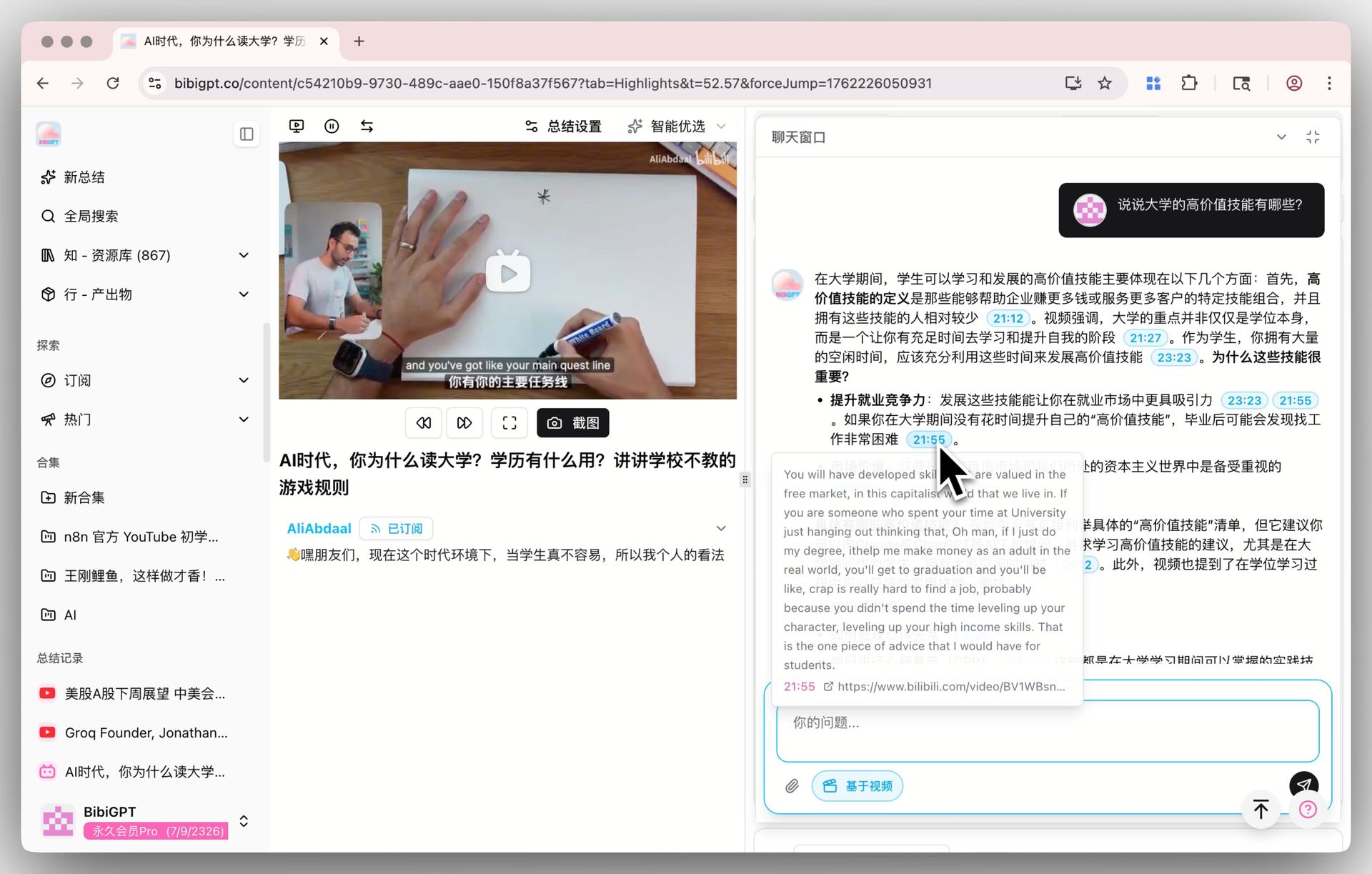 AI Video Dialog Tracing Demo
Limitation 3: No AI Q&A on Audio-Video Content
NotebookLM's conversational feature is document-based and cannot directly handle follow-up questions about video frames or audio content. BibiGPT's AI dialogue feature supports asking questions about video content, with every answer accompanied by clickable timestamps for easy source tracing back to the exact segment.
Limitation 4: No Video-to-Multiple-Format Conversion
NotebookLM's Cinematic Video converts documents into video. But if you need to convert video into articles, slide decks, mind maps, or other knowledge products, that is BibiGPT's core scenario:
- Video to Article: One-click generation of blog-ready articles with images
- Video to PPT: Automatically generate presentation slides from video summaries
- Video to Mind Map: Visually map out a video's knowledge structure
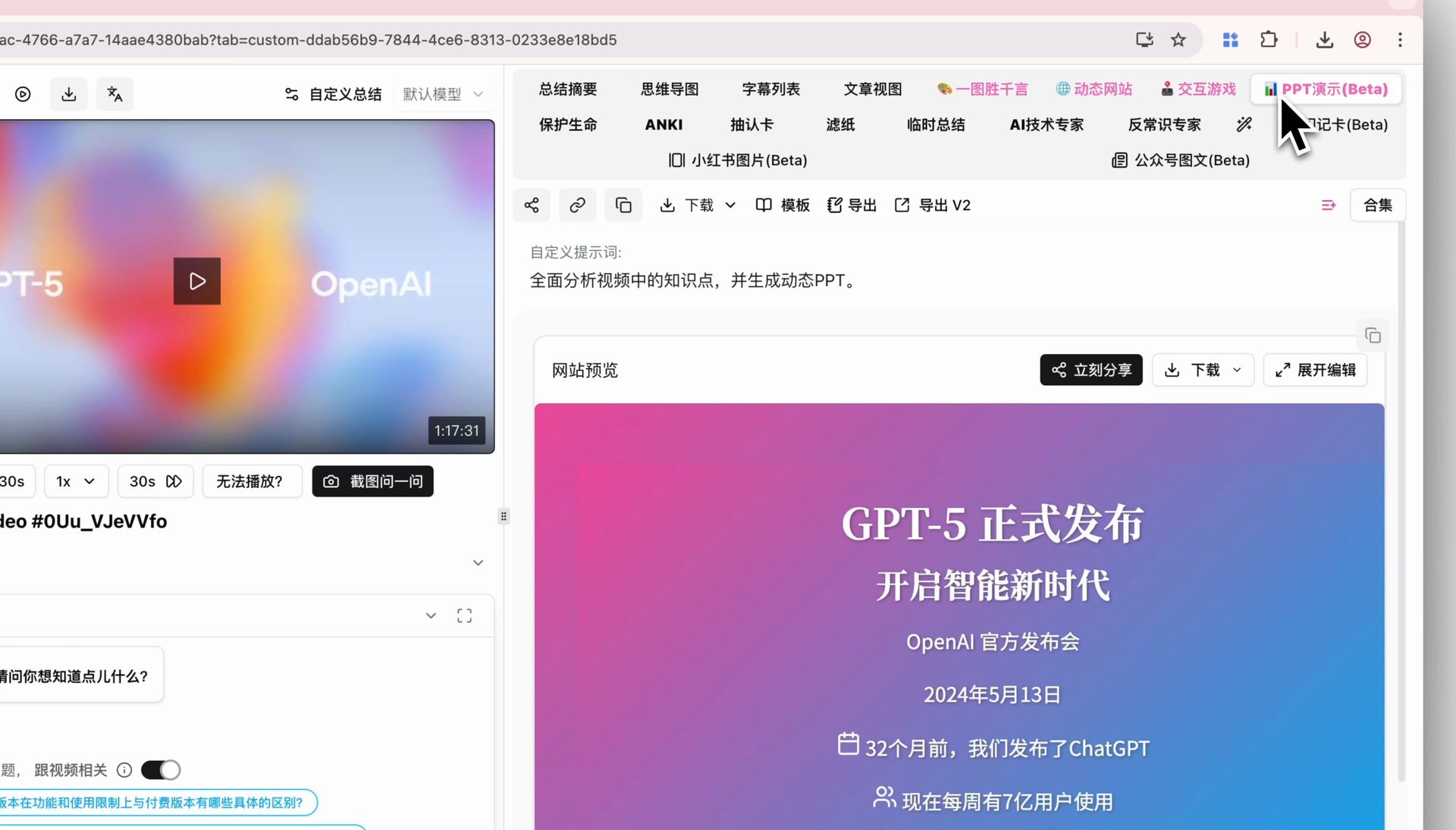 PPT Generation Demo
Deep Research + AI Video Summary: Building a Knowledge Loop
NotebookLM and BibiGPT are not competitors — they are complementary upstream and downstream components of a knowledge workflow. Combining them creates a complete knowledge loop from audio-video content consumption to deep research output. Here are three proven combination workflows.
Workflow 1: Academic Researcher's Literature + Video Synthesis
Scenario: You are researching "AI's impact on online education" with 8 papers and 5 YouTube/Bilibili lecture videos.
- Use BibiGPT to generate deep summaries of all 5 videos (with timestamps, key arguments, glossary)
- Export the BibiGPT summaries as text
- Create a NotebookLM notebook and upload all 8 papers plus 5 video summary documents
- Run Deep Research with the question: "How do different sources agree and disagree on AI's educational effectiveness?"
- Receive a cross-referenced deep research report with full citations
Workflow 2: Content Creator's Topic Research
Scenario: You are a creator planning a deep-dive article on "podcast industry trends."
- Use BibiGPT to batch-summarize 10 relevant podcast episodes
- Import podcast summaries into NotebookLM
- Use Deep Research to analyze industry trends, extract key data points and expert perspectives
- Based on the research report, use BibiGPT's article generation to rapidly produce a first draft
Workflow 3: Professional's Meeting Knowledge Repository
Scenario: You attended a series of online training sessions and need to consolidate learnings for a team briefing.
- Use BibiGPT to convert meeting recordings into structured minutes
- Import minutes into NotebookLM
- Use Deep Research to distill cross-meeting core conclusions and action items
- Use Cinematic Video Overviews to generate a team-sharing video
Advanced Tips: Making NotebookLM and BibiGPT Work Together
Once you have mastered the basic workflows, these advanced tips will further boost your efficiency. The key is understanding each tool's capability boundaries and letting them each do what they do best.
Tip 1: Use BibiGPT's Multi-Engine Transcription to Improve NotebookLM Input Quality
NotebookLM's YouTube video subtitle extraction depends on platform-provided subtitles. Many videos lack subtitles or have poor-quality auto-generated ones. BibiGPT's multi-engine transcription architecture (supporting Whisper, iFlytek, and other engines) delivers higher transcription accuracy. The resulting text provides a superior input source for NotebookLM.
Tip 2: Structured Prompts for More Precise Deep Research
When using Deep Research in NotebookLM, try structuring your question:
Research Question: [your core question]
Analysis Dimensions: [dimension 1], [dimension 2], [dimension 3]
Expected Output: [comparison table / timeline / argument synthesis]
Special Focus: [a subtopic you care most about]
Tip 3: Leverage BibiGPT's Batch Processing
If you need to research a video series (for example, an entire YouTube playlist on AI tutorials), use BibiGPT's collection summary feature to process the entire playlist at once, then batch-import all summaries into NotebookLM.
Tip 4: Use Notion or Obsidian as a Central Hub
BibiGPT supports one-click syncing to Notion and Obsidian. You can set up an automated flow:
BibiGPT video summary -> auto-sync to Notion -> periodically export to NotebookLM
This way, all your audio-video knowledge automatically accumulates in your note-taking system, ready to be pulled into NotebookLM for deep research whenever needed.
Start building your NotebookLM + BibiGPT knowledge workflow today:
- 📎 Paste any video link, get an AI summary in 30 seconds -> aitodo.co
- 🎯 30+ platforms supported including YouTube, Bilibili, podcasts, and more
- 📤 One-click export to Notion/Obsidian for seamless NotebookLM integration
FAQ
What is the difference between NotebookLM Deep Research and regular AI chatbots?
The biggest difference is "controlled sources." Regular AI chatbots (like ChatGPT, Claude, or Gemini) answer questions based on their internet training data and may produce hallucinations. NotebookLM Deep Research strictly analyzes only the source documents you uploaded, with every conclusion traceable to its original citation. This is critical for academic research and business decisions where you need to know exactly where a conclusion comes from.
Can Cinematic Video Overviews replace BibiGPT's video summarization?
No — they work in opposite directions. Cinematic Video Overviews transforms documents into video, ideal for visual knowledge presentation and sharing. BibiGPT transforms video into structured text (summaries, articles, PPTs, mind maps), ideal for efficiently extracting knowledge from audio-video content. They are complementary: BibiGPT handles "video to text" while NotebookLM handles "text to deep analysis to video presentation."
Does NotebookLM support non-English content?
Yes. NotebookLM can process PDFs, web pages, and YouTube videos in multiple languages including Chinese, Japanese, Korean, and most European languages. However, Audio Overviews and Cinematic Video Overviews voice synthesis is currently best optimized for English. BibiGPT's multilingual processing is more mature, supporting transcription, summarization, and multi-format output in Chinese, English, Japanese, and Korean.
How do I import BibiGPT video summaries into NotebookLM?
The simplest method is to copy the summary text from BibiGPT and paste it into NotebookLM using the "Paste Text" source option. If you use Notion or Google Docs as an intermediary, you can sync BibiGPT summaries to your note-taking tool first, then connect NotebookLM directly to Google Docs for import.
Who should use NotebookLM Deep Research?
Deep Research is especially valuable for: academic researchers (literature reviews and cross-analysis), market analysts (industry report comparison studies), content creators (topic research and material curation), product managers (competitive analysis and requirements research), and educators (course material integration and lesson planning). In short, anyone who needs to perform deep analysis across multiple documents will benefit significantly.
Written by the BibiGPT Team. BibiGPT is the leading AI audio-video assistant with 1M+ active users and 5M+ summaries generated. Try it now: aitodo.co