
AI Meeting Video Transcription Guide: How to Transcribe Zoom & Teams Recordings with BibiGPT
Complete guide to AI meeting transcription tools for recorded videos. Compare BibiGPT, Otter.ai, Fireflies, and tl;dv — find the best tool for transcribing your Zoom, Teams, or Lark meeting recordings.
AI Meeting Video Transcription Guide: How to Transcribe Zoom & Teams Recordings with BibiGPT
Table of Contents
- Why Meeting Recordings Are Harder Than Live Transcription
- Top 5 Tools Compared
- BibiGPT: Best AI Tool for Recorded Meetings
- Step-by-Step Tutorial
- FAQ
Quick Answer: The best AI meeting transcription tool for recorded videos in 2026 is BibiGPT — upload any Zoom, Teams, or Lark recording directly (no bot required, no pre-meeting setup), and get a timestamped transcript plus structured summary in under 30 seconds. Supports English, Chinese, Japanese, and Korean. Pro users can switch to ElevenLabs Scribe for enterprise-grade accuracy.
Try pasting your video link
Supports YouTube, Bilibili, TikTok, Xiaohongshu and 30+ platforms
Why Meeting Recordings Are Harder Than Live Transcription
Core Answer: Most AI meeting transcription tools (Otter.ai, Fireflies, tl;dv) work by joining your live meeting as a bot. They can't process recordings that already exist — a fundamentally different use case that requires a different type of tool.
The real-world scenarios where live meeting bots fall short:
- Historical recordings: That important Q3 planning call from four months ago needs to be turned into documentation for new team members
- Async work across time zones: You couldn't join the 3am global sync — now you need the key decisions in 10 minutes
- User research interviews: Recorded customer interviews that need to be turned into structured insight notes
- Privacy-restricted environments: Company security policies that block cloud-based meeting bots from joining calls
For these scenarios, you need a tool that processes the video file, not the live call. That's where BibiGPT fits.
Top 5 AI Meeting Transcription Tools Compared
Quick Rankings:
- BibiGPT — Direct file/link upload, no bot needed, 30+ platforms, multilingual (EN/ZH/JA/KO)
- Otter.ai — Best live meeting transcription (~95% accuracy), limited for recorded files
- Fireflies — Best integrations (6,000+), primarily live meeting focus
- tl;dv — Generous free tier (unlimited recordings), mainly live Zoom/Meet/Teams
- Fathom — Best free plan for live meetings, no file upload capability
| Feature | BibiGPT | Otter.ai | Fireflies | tl;dv | Fathom |
|---|---|---|---|---|---|
| Upload recorded video files | ✅ Direct upload | ❌ Live only | Partial | Partial | ❌ Live only |
| No bot required | ✅ | ❌ | ❌ | ❌ | ❌ |
| Local video files | ✅ | ❌ | ❌ | ❌ | ❌ |
| Multilingual support | EN/ZH/JA/KO | Mainly English | Multilingual | Multilingual | Mainly English |
| Custom transcription engine | Whisper + ElevenLabs | Proprietary | Proprietary | Proprietary | Proprietary |
| Structured AI summaries | Deep structure | Basic | Basic | Good | Good |
| Free plan | Yes | Yes (limited) | Yes (limited) | Unlimited | Unlimited |
| Starting price | Free | $8.33/mo | $10/mo | Free | Free |
See BibiGPT's AI Summary in Action

Bilibili: GPT-4 & Workflow Revolution
A deep-dive explainer on how GPT-4 transforms work, covering model internals, training stages, and the societal shift ahead.
Want to summarize your own videos?
BibiGPT supports YouTube, Bilibili, TikTok and 30+ platforms with one-click AI summaries
Try BibiGPT FreeOtter.ai
Otter.ai leads the live meeting transcription space with ~95% accuracy and real-time speaker identification. The limitation: it works as a bot that joins your meeting in progress. Processing a pre-recorded video file is not its primary use case. Best for live meeting note-taking.
Fireflies
Fireflies excels at integrations — 6,000+ apps including Salesforce, HubSpot, and Slack. Like Otter.ai, it's designed primarily as a live meeting bot. Limited support for standalone recorded video files.
tl;dv
tl;dv offers a genuinely unlimited free tier for Zoom, Google Meet, and Teams recordings. It supports uploading recordings in some cases, but the workflow is less streamlined than BibiGPT for processing arbitrary video files. Strong option for teams already on these platforms.
The Key Insight: Most Tools Are Built for Live Meetings
The transcription market is dominated by live-meeting bots. If you need to process recordings — especially from platforms other than Zoom/Meet/Teams, or local files — BibiGPT is the clear choice.
BibiGPT: Best AI Tool for Recorded Meeting Transcription
Core Answer: BibiGPT processes MP4, MOV, M4A, WAV, and MP3 meeting recordings directly — no bot, no pre-meeting configuration, no platform restrictions. Trusted by over 1 million users.
Zero Setup Required
No need to add a bot before the meeting, no calendar integrations required, no admin permissions needed. After the meeting, upload the recording file directly or paste the recording share link from Zoom, Lark, or Teams.
Related feature: AI Meeting Video to Document
Professional-Grade Transcription Engine
For critical recordings — client calls, board meetings, user research — BibiGPT lets you switch to ElevenLabs Scribe (industry-leading accuracy with strong speaker diarization) using your own API key.
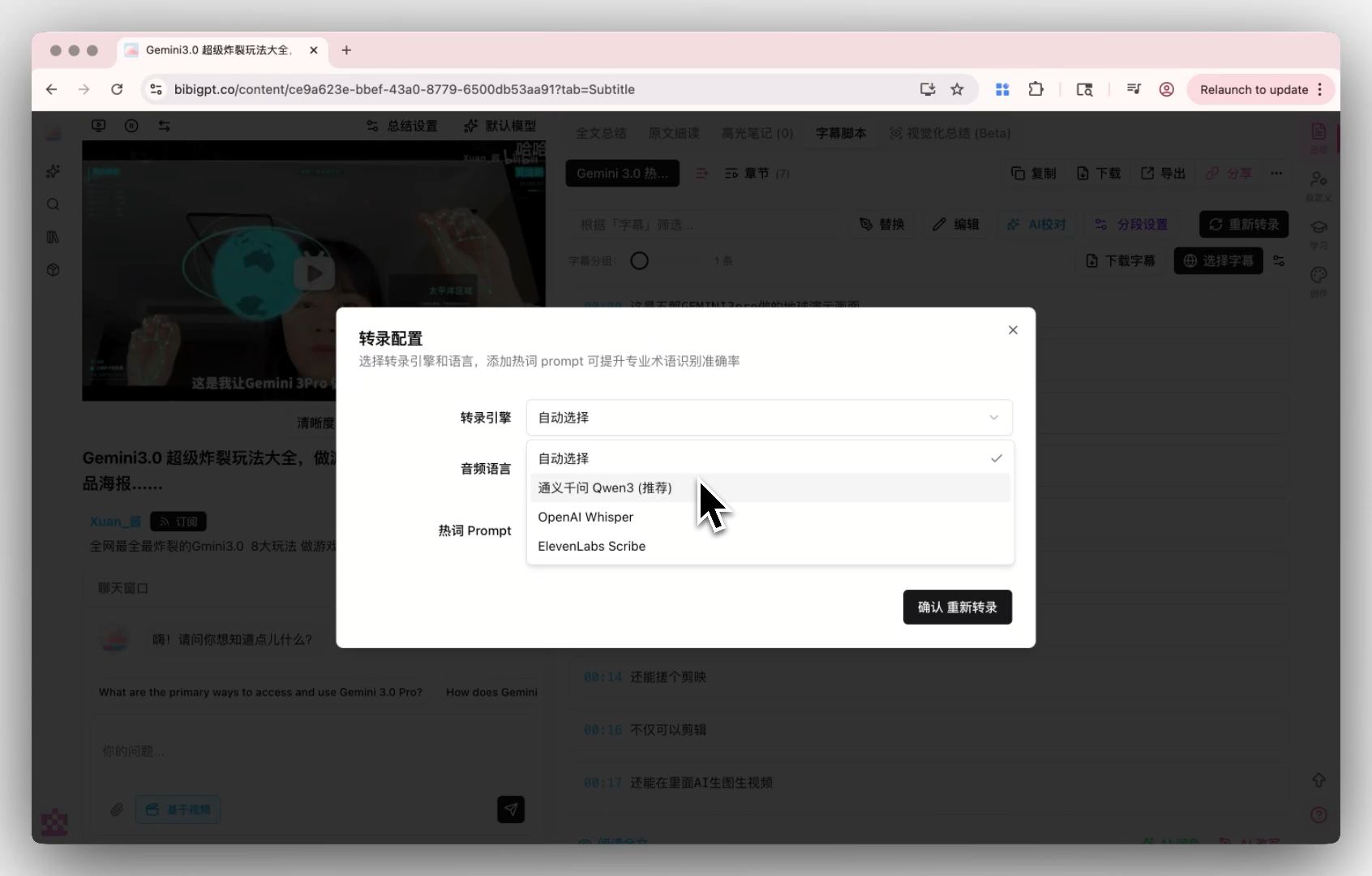 BibiGPT transcription engine selection
Deep Structured Summaries
Beyond raw transcription, BibiGPT's Smart Deep Summary automatically generates structured output: key decisions, action items, terminology explanations, and a searchable full transcript — all timestamped.
Related reading: Best AI Meeting Transcription & Note-Taking Tools 2026
Step-by-Step Tutorial: Transcribe a Meeting Recording in 3 Steps
Core Answer: Upload your meeting recording to BibiGPT (file or share link), wait 30 seconds to a few minutes depending on length, receive transcript + structured summary ready to export.
Step 1: Upload Your Recording
Option A (local file): Drag and drop your .mp4 / .mov / .m4a / .mp3 / .wav file onto the BibiGPT desktop app or web interface. Option B (share link): Paste a Zoom, Lark, or Teams recording share link directly into BibiGPT.
Step 2: Wait for AI Processing
BibiGPT automatically runs:
- Video/audio decoding
- Speech-to-text transcription (default: OpenAI Whisper; optional: ElevenLabs Scribe)
- Language detection and translation (if needed)
- Structured summary generation (decisions + action items + keywords)
Step 3: Review, Edit, and Export
Your outputs:
- Full timestamped transcript (click any timestamp to jump to that moment in the video)
- Structured summary with action items and key decisions
- Optional: mind map, AI chat for follow-up questions
- Export to Markdown, Notion, PDF, or plain text
FAQ
How long of a meeting recording can BibiGPT handle?
BibiGPT handles recordings over 2 hours long. Free plan has length limits; Pro supports extended videos with dedicated large-file processing optimization on the desktop client.
Is my meeting content private and secure?
BibiGPT offers a Local Privacy Mode (Pro feature) where all transcription and processing runs locally on your device — no audio or video content is uploaded to external servers. Enterprise clients can request data compliance documentation.
Does BibiGPT support speaker diarization (who said what)?
Yes. BibiGPT provides speaker identification in transcripts. Switching to the ElevenLabs Scribe engine significantly improves speaker diarization accuracy for complex multi-speaker meetings.
What's the difference from Otter.ai?
The core difference is timing: Otter.ai needs to join your meeting live. BibiGPT works on recordings after the fact — with no pre-meeting setup, no bot joining your call, and support for video files from any source.
Start your AI efficient learning journey now:
- 🌐 Official Website: https://aitodo.co
- 📱 Mobile Download: https://aitodo.co/app
- 💻 Desktop Download: https://aitodo.co/download/desktop
- ✨ Learn More Features: https://aitodo.co/features
BibiGPT Team