
Gemini Notebooks vs NotebookLM 2026: Which One Actually Handles Your Video Workflow?
A practical 2026 comparison of Google Gemini Notebooks and NotebookLM — feature matrix, source limits, video URL support, privacy. Plus why BibiGPT remains the go-to for YouTube, Bilibili, podcast and TikTok learners.
Gemini Notebooks vs NotebookLM 2026: Which One Actually Handles Your Video Workflow?
Bottom line: Gemini Notebooks and NotebookLM are two separate Google products — Gemini Notebooks lives inside the Gemini App as a structured research container for a single conversation, while NotebookLM is a standalone multi-source knowledge base with Audio Overviews. Neither one treats "paste a video URL and get a summary" as a first-class input. If that is your core workflow, BibiGPT is the simpler answer across 30+ platforms (YouTube, Bilibili, Spotify, Apple Podcasts, TikTok, and more).
One-line comparison: Gemini Notebooks = structured research in a Gemini chat; NotebookLM = long-lived multi-document knowledge base + Audio Overview; BibiGPT = 30+ video and podcast platforms, paste the link and you are done.
Try pasting your video link
Supports YouTube, Bilibili, TikTok, Xiaohongshu and 30+ platforms
How Gemini Notebooks and NotebookLM Actually Differ
Many users hear "Gemini Notebooks" and assume it is a rebranded NotebookLM. It is not. They are two separate product lines that happen to share the same underlying Gemini model.
- Gemini Notebooks sits inside gemini.google.com. It lets you attach documents, images, and URLs to a single conversation so Gemini has a structured scratchpad while answering you. Think of it as "chat + context panel."
- NotebookLM (notebooklm.google.com) is a standalone web app launched in 2023. It is built around "upload up to 50+ sources per notebook, then ask questions, get summaries, and generate Audio Overviews." Since 2024 it has also accepted YouTube URLs and public websites as sources.
Both use Gemini under the hood, but the product shapes are very different. Google positions Gemini Notebooks as "a smarter chat" and NotebookLM as "a durable research workspace." If you're stuck on which to pick, it comes down to whether you want a one-off research session (Gemini Notebooks) or a persistent project notebook (NotebookLM).
Feature Matrix
| Dimension | Gemini Notebooks | NotebookLM | BibiGPT |
|---|---|---|---|
| Source limit | Tied to Gemini chat context, roughly 10+ attachments | Up to 50 sources per notebook | No hard cap — URL is processed per request |
| Accepted inputs | Files, images, URLs | PDFs, Google Docs, websites, YouTube URLs, pasted text | 30+ platforms: YouTube, Bilibili, TikTok, Spotify, Apple Podcasts, cloud drive files, and more |
| Native non-English video support | No | YouTube URLs with captions only, mostly optimized for English | Native — paste a Bilibili, TikTok, or podcast link directly |
| Audio Overview / dual-host podcast | No | Yes (mostly English, other languages rolling out) | Dual-host podcast generation with native multilingual voices |
| Mind map | No | Mind Map view | Inline mind map with XMind and Markmap, timestamp-clickable nodes |
| Timestamp citations | No | Document-level citations | Click-to-jump timestamps with source preview |
| Pricing | Included with Gemini subscription | Free + NotebookLM Plus | Subscription + pay-as-you-go |
The hardest limit on Gemini Notebooks is that it rides on the Gemini conversation context — you cannot keep 50 PDFs pinned like a persistent project. NotebookLM is stronger on the "upload + Q&A + Audio Overview" triangle, but its video input story is still narrow: YouTube URLs must have accessible captions, and Bilibili, TikTok, and podcasts are not even in the source list.
Three Real Workflows, Same Task
Let's use one concrete scenario: "I just found a 1-hour Bilibili AI course. I want to extract the key points, get a mind map, and generate a commute-friendly podcast version."
Path A: Gemini Notebooks
- Manually download the Bilibili video (third-party tool required)
- Run it through a separate tool to extract captions
- Paste the captions into a Gemini conversation
- Ask Gemini to summarize — you will get structured bullets
- For a mind map, ask it to output Markdown and paste into XMind yourself
Pain: The first two steps have nothing to do with "conversational research" and take more than 10 minutes of fiddling.
Path B: NotebookLM
- Paste the Bilibili URL — ❌ NotebookLM rejects it, only YouTube URLs are accepted
- Try uploading the downloaded MP3 — ❌ NotebookLM still does not support audio files as a source type (true as of April 2026)
- You end up doing "export captions → translate to English → upload as PDF → ask questions"
Pain: The whole "multi-source knowledge base" promise falls apart for non-English video content.
Path C: BibiGPT
- Paste the Bilibili URL → 30-second structured summary with timestamps
- Click "Mind Map" → instantly switch to the XMind or Markmap view
- Click "Podcast" → generate a dual-host audio overview with a full transcript
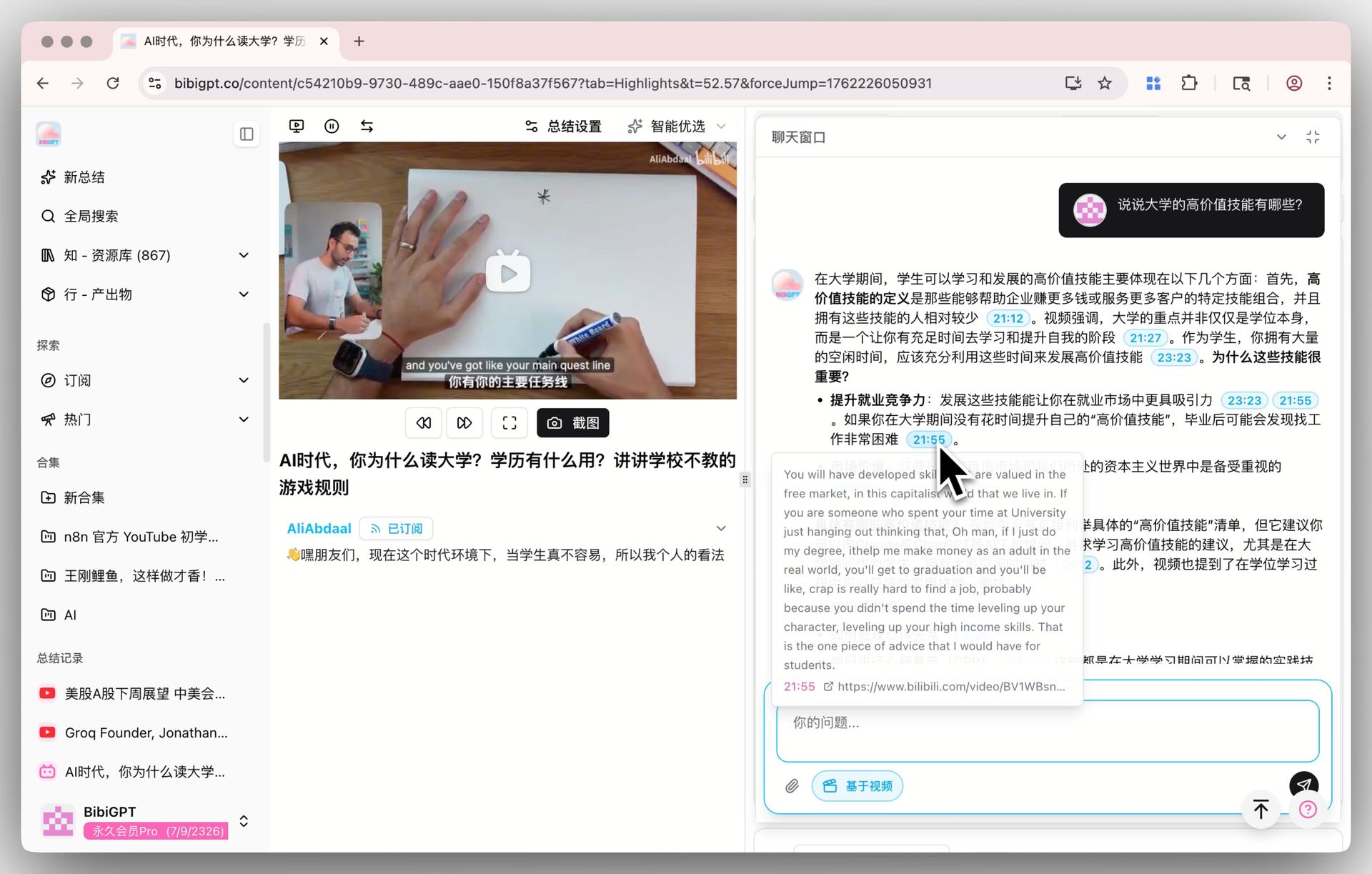 BibiGPT AI video dialog with source tracing
All three happen on the same page, no file conversion, no tool juggling. That is the "URL as a first-class input" difference.
The Non-English Video Gap
NotebookLM added YouTube URLs as a source type in late 2024, but two conditions must be met:
- The video has extractable captions (auto-generated captions that cannot be pulled via API do not count)
- The video is publicly accessible and not region-locked
Even when both are true, NotebookLM's handling of Chinese and Japanese captions is noticeably weaker than English (segmentation and term recognition drop detail). Meanwhile, users outside the English bubble actually consume:
- Bilibili, Douyin, TikTok, WeChat Video Channels, Xiaoyuzhou — 70%+ of daily watch time for Chinese users
- Japanese YouTube channels where captions are sparse
- Podcasts on Xiaoyuzhou, Apple Podcasts, Spotify — completely outside NotebookLM's source list
That is exactly why BibiGPT has grown to 1M+ active users: it was designed around the apps people actually open every day, not the platforms Google happens to index. Paste a Bilibili link, a TikTok share link, a podcast link — it just works.
See BibiGPT's AI Summary in Action

Bilibili: GPT-4 & Workflow Revolution
A deep-dive explainer on how GPT-4 transforms work, covering model internals, training stages, and the societal shift ahead.
Want to summarize your own videos?
BibiGPT supports YouTube, Bilibili, TikTok and 30+ platforms with one-click AI summaries
Try BibiGPT FreePrivacy and Data Ownership
Google draws slightly different lines for the two products:
- Gemini Notebooks: inherits the Gemini App privacy settings. With history on, data may be used to improve Gemini (you can turn it off).
- NotebookLM: Google explicitly says uploaded sources are not used to train models. But conversation history is still stored in your Google account.
- BibiGPT: offers a local privacy mode where transcripts and summaries can stay on-device for sensitive content; subscription data is never used for model training.
If you are processing internal meeting recordings, unreleased course material, or confidential interviews, these differences matter directly.
Who Should Use Which
| User type | First pick | Why |
|---|---|---|
| English research with lots of PDFs | NotebookLM | 50-source multi-document Q&A is its strongest scenario |
| Gemini power user (writing + research) | Gemini Notebooks | Attach references inside the chat context |
| Non-English video learner (Bilibili, Japanese YouTube, Korean channels) | BibiGPT | Native URL input across 30+ platforms |
| Podcast listener (Xiaoyuzhou, Apple, Spotify) | BibiGPT | Broadest podcast coverage with dual-host generation |
| Content creator (video to article/social post) | BibiGPT | AI video-to-article in one click |
For deeper side-by-side details, also read NotebookLM vs BibiGPT 2026 full comparison and the earlier post on NotebookLM's non-English video gap. If podcasts are your main use case, the 2026 podcast transcription shootout is a good next stop.
FAQ
Q1: Will Gemini Notebooks replace NotebookLM?
A: No. Gemini Notebooks is a chat container whose context scrolls with the conversation; NotebookLM is a persistent multi-document workspace. Google has not signaled any plan to merge them.
Q2: When will NotebookLM support Bilibili, TikTok, or podcast URLs?
A: Google has not published a roadmap. Given its current positioning around PDFs/Docs/YouTube, non-English video support is unlikely to land soon. If your workflow depends on it, BibiGPT is a pragmatic complement — not a replacement.
Q3: I only work in English. Is NotebookLM enough?
A: If 90% of your material is English PDFs and English YouTube channels, NotebookLM's Audio Overview and Mind Map are genuinely strong. But the moment you need to process a Bilibili video or a Chinese podcast, BibiGPT becomes necessary. Many users run both in parallel: BibiGPT as the "multilingual video front end" and NotebookLM as the "English document vault."
Q4: How is BibiGPT's mind map different from NotebookLM's?
A: NotebookLM's Mind Map is generated across an entire notebook of sources and leans topical. BibiGPT's inline mind map is built from a single video's chapter structure, and each node jumps directly to the matching timestamp — better for "watch while taking notes."
Wrap-Up
Gemini Notebooks and NotebookLM represent Google's two bets on "conversation + knowledge base," and for English users they are genuinely powerful. But if your workflow includes Bilibili, Japanese YouTube, or any podcast outside Google's reach, BibiGPT is the piece that actually connects everything. The three tools are not mutually exclusive: treat BibiGPT as your "multilingual video front end," NotebookLM as your "English document vault," and Gemini Notebooks as your "in-chat research scratchpad."
Start your AI efficient learning journey now:
- 🌐 Official Website: https://aitodo.co
- 📱 Mobile Download: https://aitodo.co/app
- 💻 Desktop Download: https://aitodo.co/download/desktop
- ✨ Learn More Features: https://aitodo.co/features
BibiGPT Team