
AI Video Notes for Efficient Learning: Complete BibiGPT Workflow Guide 2026
Watching hours of videos but retaining nothing? BibiGPT provides a complete AI learning workflow from video to knowledge internalization: auto-extract subtitles, AI structured notes, mind maps, highlight key insights, and export to Notion and Obsidian in five steps.
AI Video Notes for Efficient Learning: Complete BibiGPT Workflow Guide 2026
Table of Contents
- The Problem: Why 100 Hours of Video Watching Leads to Zero Retention
- The 5-Step Workflow: From Video to Knowledge Internalization
- Learning Science Integration: Making the AI Workflow Even More Effective
- Four Real-World Scenarios: Practical Use Cases
- FAQ
- Conclusion: Redefining Video Learning with AI Workflows
The Problem: Why 100 Hours of Video Watching Leads to Zero Retention
You have probably experienced this: spending an entire weekend binge-watching 30 episodes of a Coursera course, feeling like you learned a lot, only to realize on Monday morning that your mind is blank — key concepts are fuzzy, logical connections between arguments have broken down, and you cannot remember which video covered what.
This is not a memory problem. Passive watching is fundamentally an ineffective learning method. Cognitive science research shows that knowledge retention from passive video watching is only 5%-10%, while combining notes, mind maps, and active recall can boost retention to 50%-90%.
The catch: manual note-taking is painfully slow — a 60-minute video requires 20 minutes of note-taking. Drawing mind maps manually is even slower, and you will inevitably miss key information.
BibiGPT's solution: A complete AI workflow from "watching videos" to "knowledge internalization," covering subtitle extraction, AI structured notes, mind map generation, highlight core insights, and note export — compressing hours of manual note-taking into minutes while maintaining note quality far beyond handwritten notes.
See BibiGPT's AI Summary in Action

Bilibili: GPT-4 & Workflow Revolution
A deep-dive explainer on how GPT-4 transforms work, covering model internals, training stages, and the societal shift ahead.
Want to summarize your own videos?
BibiGPT supports YouTube, Bilibili, TikTok and 30+ platforms with one-click AI summaries
Try BibiGPT FreeThe 5-Step Workflow: From Video to Knowledge Internalization
Battle-tested by 1M+ users and 5M+ AI summaries, here is BibiGPT's five-step video learning workflow.
Step 1: Paste Video URL and Auto-Extract Subtitles
Open BibiGPT and paste your video URL into the input field. BibiGPT supports 30+ platforms — YouTube, Bilibili, TikTok, podcasts (Apple Podcasts, Spotify), TED, Coursera, and more. You can also upload local audio and video files directly.
After pasting the link, BibiGPT automatically:
- Identifies the platform and video format: No manual selection needed — the system detects it automatically
- Extracts the complete subtitle text: Including timestamps, with multi-language subtitle support
- Handles videos without subtitles: For videos without embedded subtitles, BibiGPT uses advanced AI speech-to-text technology with extremely high accuracy
This step solves a core problem: making video content searchable and processable as text. Many learners do not realize that converting video to text is the starting point for all deep learning workflows.
Step 2: AI Summary Generates Structured Notes
After subtitle extraction, BibiGPT's advanced AI performs deep content analysis and generates structured AI notes. This is not a simple "summary" — it is a structured knowledge document that can genuinely replace manual notes:
- Core argument extraction: Accurately identifies 3-5 core arguments from thousands of words of subtitles
- Logic structure restoration: Organizes content following the speaker's logical flow, not mechanical truncation
- Key data and case annotation: Numbers, case studies, citations, and other high-value information are never missed
- Timestamped key point references: Every key point links back to the exact timestamp in the original video for easy verification
For learners, this means you can understand all the core content of a 60-minute video in 2 minutes, then decide whether you need to watch specific chapters in depth — this is the first step of efficient learning.
For more on how AI can enhance your learning methods, check out our AI audio video summary learning efficiency guide.
Step 3: Mind Map — A Visual Overview of Video Knowledge Structure
After structured notes, BibiGPT automatically generates a corresponding mind map. This is the critical step that transforms linear video content into a spatial knowledge structure.
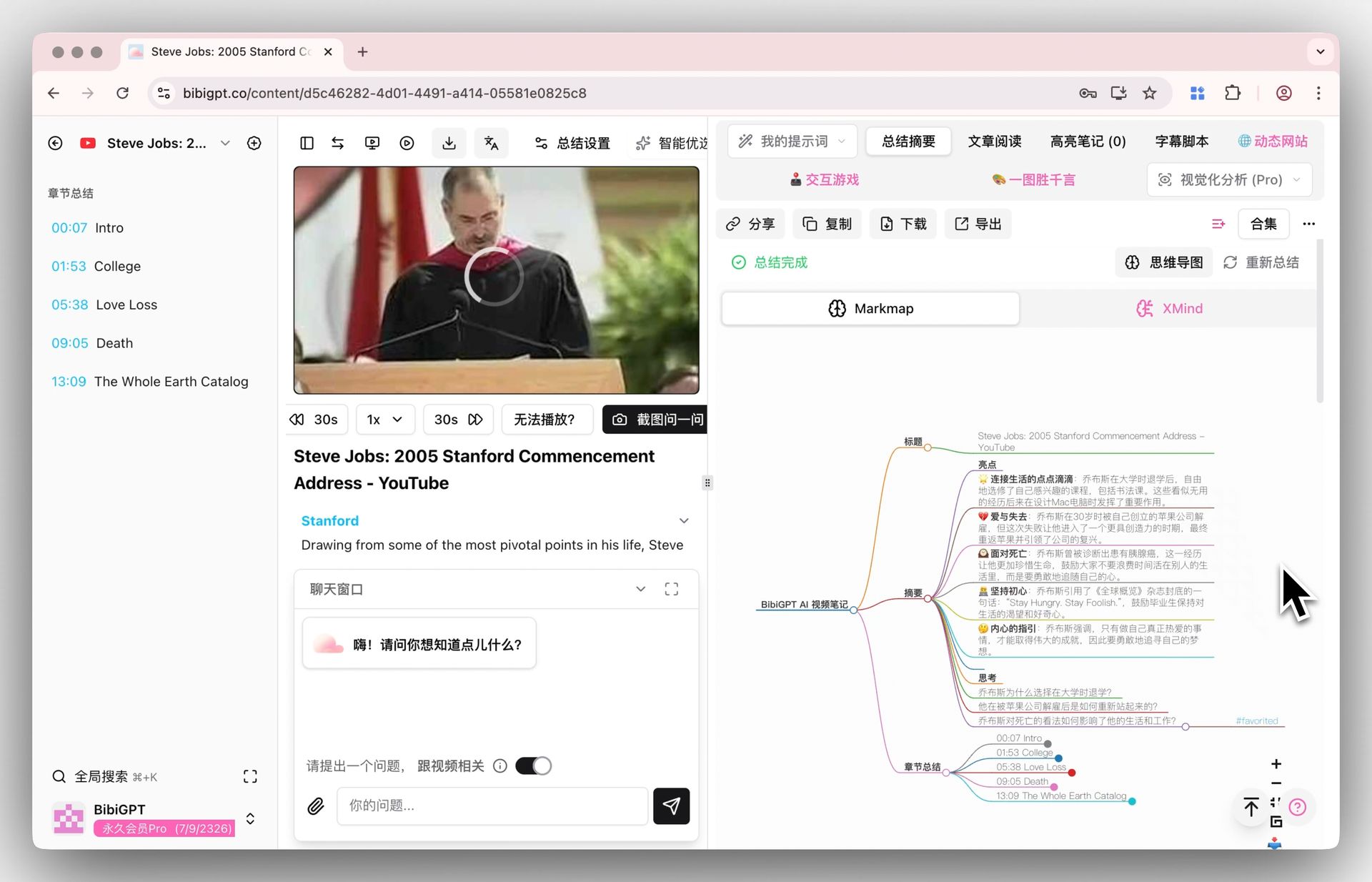 Mind map display
The learning value of mind maps:
- Global perspective: One map reveals the entire video's knowledge architecture — no more getting lost in details
- Relationship visualization: Hierarchical and associative relationships between concepts become immediately clear
- Memory anchors: Visual structures are easier for the brain to encode and remember than plain text
- Efficient review: Quickly browse the mind map before an exam or meeting — 3 minutes to restore full memory
AI Mind Map Preview
Bilibili: GPT-4 & Workflow Revolution
A deep-dive explainer on how GPT-4 transforms work, covering model internals, training stages, and the societal shift ahead.
Want to summarize your own videos?
BibiGPT supports YouTube, Bilibili, TikTok and 30+ platforms with one-click AI summaries
Try BibiGPT FreeThe mind map supports expanding/collapsing nodes, zooming, and exporting as image or Markdown format. You can screenshot it directly into your notes or export it for further editing.
Step 4: AI Highlight Notes — Extract Core Insights
Building on the AI summary and mind map, BibiGPT's AI highlight notes feature further distills core insights:
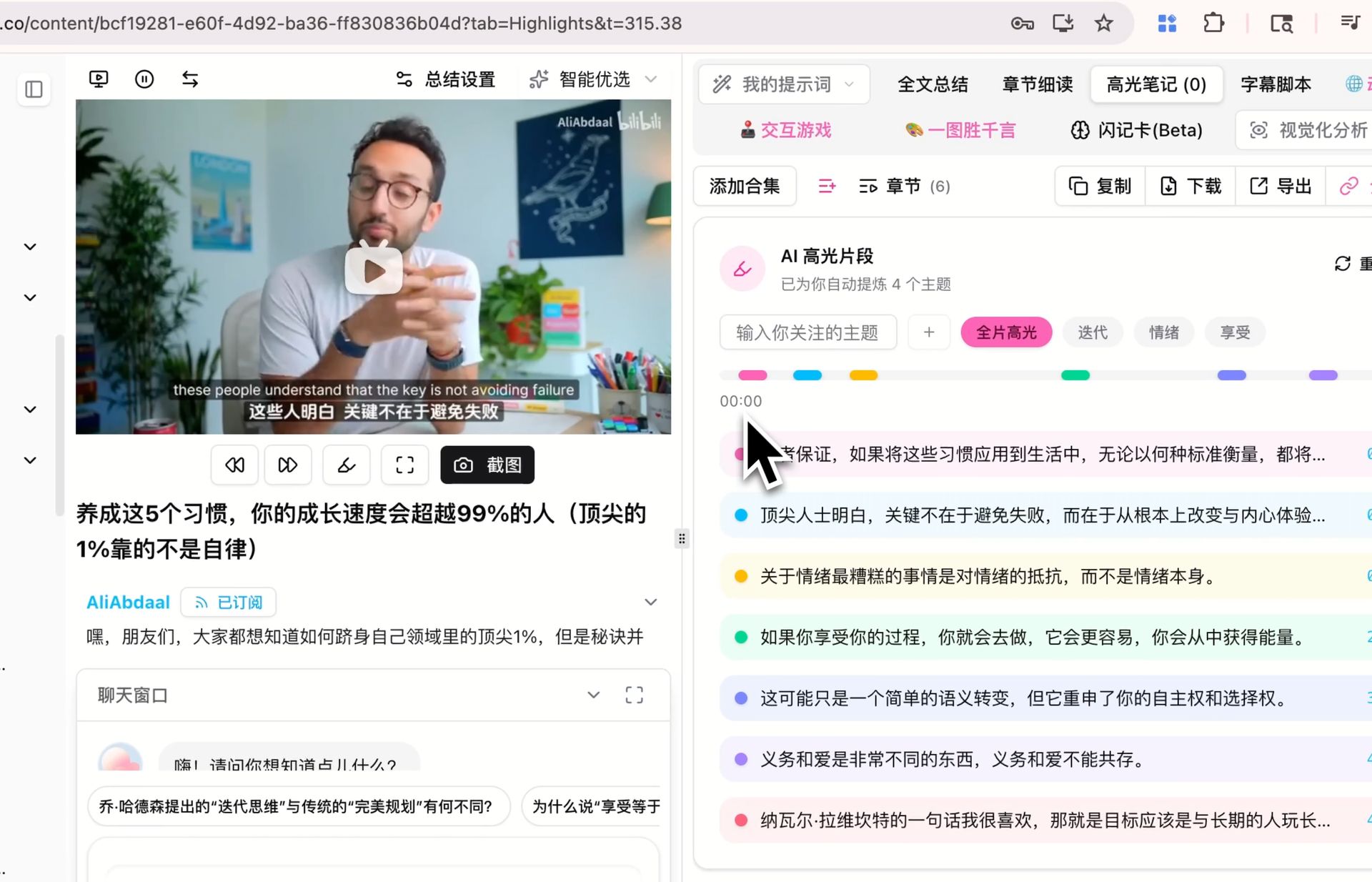 AI highlight notes demo
The unique value of AI highlight notes:
- Insight-level distillation: Not paragraph summaries, but precise extraction of each core insight
- Importance marking: Advanced AI automatically judges the importance level of each point, using different highlight levels to distinguish
- Context preservation: Each highlighted insight retains sufficient context so meaning is not lost through over-compression
- Traceable citations: Click any highlighted passage to jump to the corresponding timestamp in the video
This step completes the leap from "information" to "insight." What you hold is no longer a lengthy set of notes, but a refined, actionable knowledge checklist.
Step 5: Export to Notion and Obsidian — Build Your Knowledge Base
The final step is exporting processed content to your knowledge management system, integrating these notes into your long-term memory system. BibiGPT supports multiple export methods:
- Notion sync: One-click sync of AI summaries, highlight notes, and mind maps to your Notion workspace, automatically creating perfectly formatted pages
- Obsidian export: Export as Markdown format, drop directly into your Obsidian vault, seamlessly connecting with your bidirectional linking note system
- Other formats: Supports Markdown, JSON, and ZIP bundle export, compatible with any note-taking tool
For a deep dive on integrating BibiGPT with Notion, see our Notion integration complete guide. If you are an Obsidian user, check out the Obsidian integration guide.
Export is not the end — it is the starting point of knowledge internalization. When your video notes converge with daily notes, reading notes, and work notes in the same knowledge base, cross-domain knowledge connections emerge naturally — this is what true deep learning looks like.
Learning Science Integration: Making the AI Workflow Even More Effective
BibiGPT's five-step workflow is not just a technical tool process — it naturally integrates with proven learning methodologies. Here are three of the most effective combinations:
Active Recall
After BibiGPT generates the AI summary, do not read it immediately. First try to recall what the video covered, write down 3-5 key points from memory, then compare with the AI summary. This "recall first, compare second" approach can boost knowledge retention by 2-3x.
How to practice: Watch video → Close video and list key points from memory → Open BibiGPT summary to compare → Mark missed points for focused review
Spaced Repetition
After exporting BibiGPT's highlight notes, review them on a 1-3-7-14 day schedule. Mind maps are especially well-suited for spaced review — spend 2 minutes browsing the mind map during each review session, then try to reconstruct the detailed nodes from memory.
How to practice: Export highlight notes to Notion → Set review reminders → Use mind maps for quick recall tests
Feynman Technique
BibiGPT's AI dialogue feature is the perfect partner for the Feynman Technique. After watching the video and reading the AI summary, use your own words to "explain" the core content in the AI dialogue, then let the AI point out gaps or misconceptions in your understanding — like having a learning partner available around the clock.
How to practice: Read AI summary → Explain the content in your own words via AI dialogue → Ask "What did I miss in my understanding?" → Iterate and refine
For more on combining the Feynman Technique with AI tools, see our Feynman learning method video knowledge absorption guide.
Four Real-World Scenarios: Practical Use Cases
Scenario 1: Online Course Learning
User profile: Working professionals or students learning programming, design, finance, and other skills
Pain point: A Udemy course has 40 video lectures, each 30-60 minutes. Watching everything takes 30+ hours — impossible during workweeks.
BibiGPT workflow:
- Batch paste the entire course's video links (supports playlist batch summarization)
- Read the AI summary for each lecture first — get the full course framework in 5 minutes
- Mark the 5-8 core lectures that truly need deep viewing
- Generate mind maps and highlight notes for core lectures
- Export to Obsidian to build a course knowledge graph
Result: 30-hour course → 2 hours for core knowledge + 8 hours for key chapters. Total time reduced by 60%+.
Scenario 2: Conference Talks and Presentations
User profile: Product managers, analysts, and professionals tracking industry trends
Pain point: WWDC, Google I/O, and industry summit talks run 2+ hours each, with 20+ sessions per conference. Watching everything is unrealistic.
BibiGPT workflow:
- Paste the talk video URL
- Read the AI summary to quickly identify topics relevant to your work
- Use AI dialogue to ask about specific technical details or decision context
- Export key conclusions and action items to your team's Notion knowledge base
Result: Core information from 20 talks captured in 1 hour. No more FOMO.
Scenario 3: Podcast Deep Learning
User profile: Knowledge workers and content creators who listen to podcasts during commutes
Pain point: Podcasts feel productive while listening, but content vanishes after. Cannot take notes while commuting, and too lazy to re-listen at the desk.
BibiGPT workflow:
- Paste podcast link (supports Apple Podcasts, Spotify, and more)
- BibiGPT auto-transcribes and generates structured notes
- Highlight inspiring insights, dig deeper with AI dialogue
- Export notes and connect them with your existing knowledge system
Result: 1-hour commute podcast → 5-minute complete notes after getting off. Never "listen and forget" again.
Scenario 4: Academic Research and Literature Review
User profile: Graduate students, PhD candidates, and academic researchers
Pain point: YouTube and academic platforms host countless lectures and course recordings. You need to extract citations, methodologies, and core arguments.
BibiGPT workflow:
- Paste the academic lecture or course recording URL
- Use the AI summary to quickly understand the methodological framework and core arguments
- Extract citable key statements and data through highlight notes
- Export to Obsidian, integrating with literature notes and research notes
Result: 10 hours of academic video → 1 hour of structured notes. Literature review efficiency dramatically improved.
FAQ
How good is the quality of BibiGPT's AI notes? Can they replace manual notes?
BibiGPT uses advanced AI technology for deep content analysis. The structured notes generated typically surpass quick manual notes in both accuracy and completeness. It is particularly strong at capturing data points, argument logic, and structural relationships you might miss. We recommend treating AI notes as a "high-quality first draft" and adding your personal understanding and annotations on top — this combined approach produces the best learning outcomes.
Which video platforms are supported? Can local files be processed?
BibiGPT supports video and audio content from 30+ platforms, including YouTube, Bilibili, TikTok, TED, Coursera, podcast platforms, and more. It also supports direct upload of local audio and video files (MP4, MP3, WAV, and other common formats), so any video source can be processed.
Can mind maps be edited and exported?
Yes. Mind maps generated by BibiGPT support online node expansion/collapse and zoom browsing. You can export mind maps as images or Markdown format for further editing in other tools. Exported mind map files can be imported into professional mind mapping tools like XMind and MindNode for continued editing.
Conclusion: Redefining Video Learning with AI Workflows
In 2026, where video content is exploding, the learning bottleneck is no longer "finding good videos" — it is "watching too much, retaining nothing, and applying less." BibiGPT's five-step AI workflow — extract subtitles, generate notes, build mind maps, highlight core insights, export to knowledge base — constructs a complete path from passive watching to active knowledge internalization.
1M+ users are already using this workflow to boost their learning efficiency. Whether you are learning programming, preparing for certifications, conducting research, or tracking industry trends, this methodology-plus-tool combination helps you master more knowledge in less time.
Start your AI efficient learning journey now:
- 🌐 Official Website: https://aitodo.co
- 📱 Mobile Download: https://aitodo.co/app
- 💻 Desktop Download: https://aitodo.co/download/desktop
- ✨ Learn More Features: https://aitodo.co/features
BibiGPT Team