
BibiGPT v4.228.0 Update Say Goodbye to Tedious Tasks Auto-Translate Audio Video and Efficient Command Palette Now Available
BibiGPT v4.228.0 brings multiple feature updates and experience optimizations, including auto-translate on upload, command palette, comprehensive multilingual experience upgrade, and more, making your audio-video learning and creation more efficient and smooth.
BibiGPT v4.228.0 Update: Say Goodbye to Tedious Tasks! Auto-Translate Audio & Video and Efficient Command Palette Now Available
Dear BibiGPT users,
This week we've brought multiple feature updates and experience optimizations designed to make your audio-video learning and creation more efficient and smooth.
Watch Faster 🚀
-
Auto-Translate on Upload Now, when uploading audio or video files, you can directly set the "auto-translate" target language! For example, you can choose to translate an English source video directly to Simplified Chinese. BibiGPT will automatically complete the translation during the transcription process, and display bilingual subtitles and summaries once processing is complete. This eliminates the tedious steps of manual translation, making multilingual learning a one-step process and greatly improving the efficiency of obtaining bilingual content.
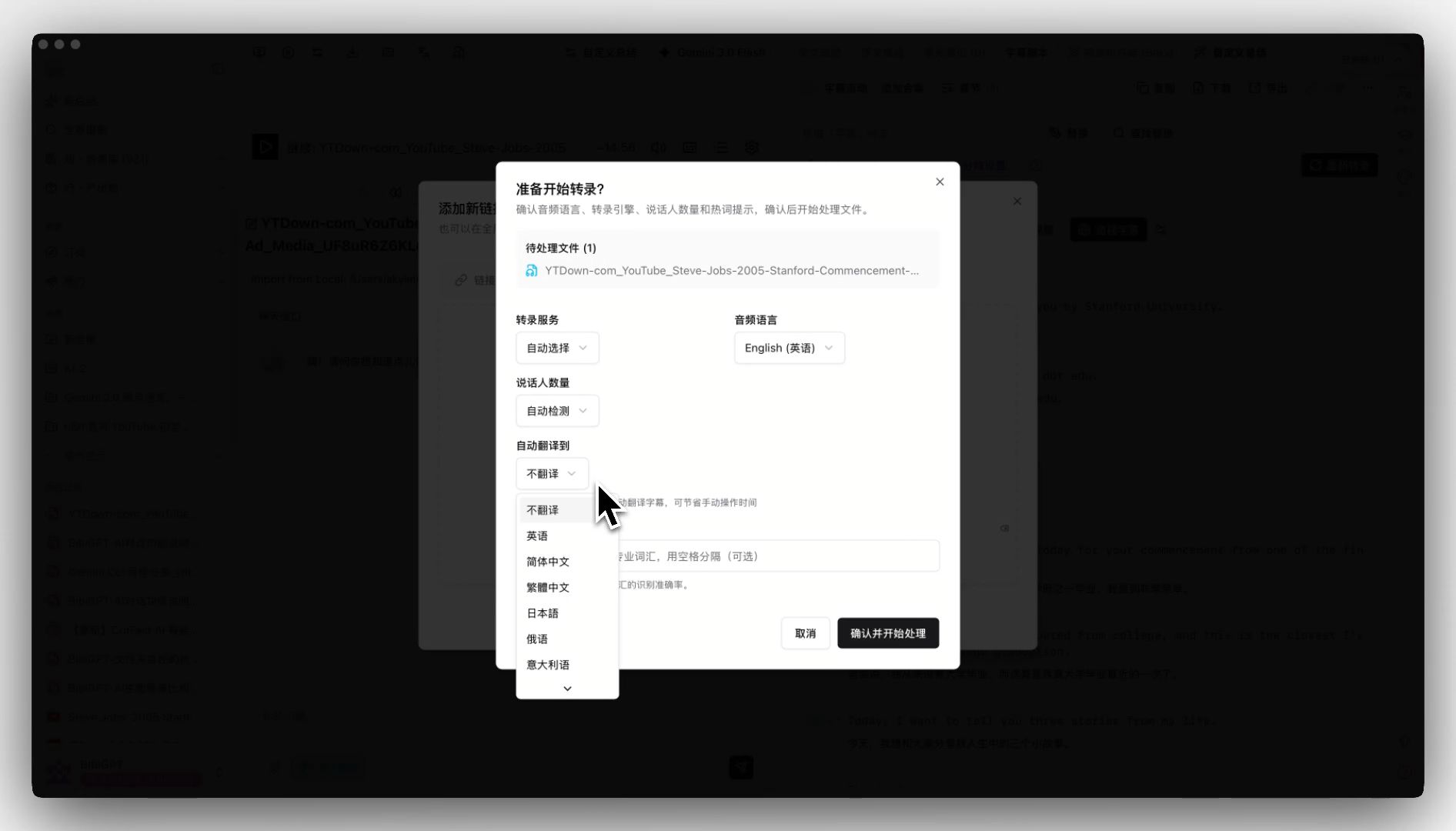 auto-translate-upload-entry
This feature greatly improves the efficiency of multilingual learners, making it more convenient to obtain bilingual content. If you want to learn more about AI audio-video summary tools, check out our features page.
Search Better 🔍
-
Command Palette To make your operations in BibiGPT more convenient, we've launched the new "Command Palette" feature. Now, simply press
Command + P(Mac) orCtrl + P(Windows) to open the global search box. You can quickly jump to pages (such as settings) or switch views on the video summary page (such as switching from full summary to highlight notes) by entering keywords. Say goodbye to tedious menu searching and boost your operational efficiency!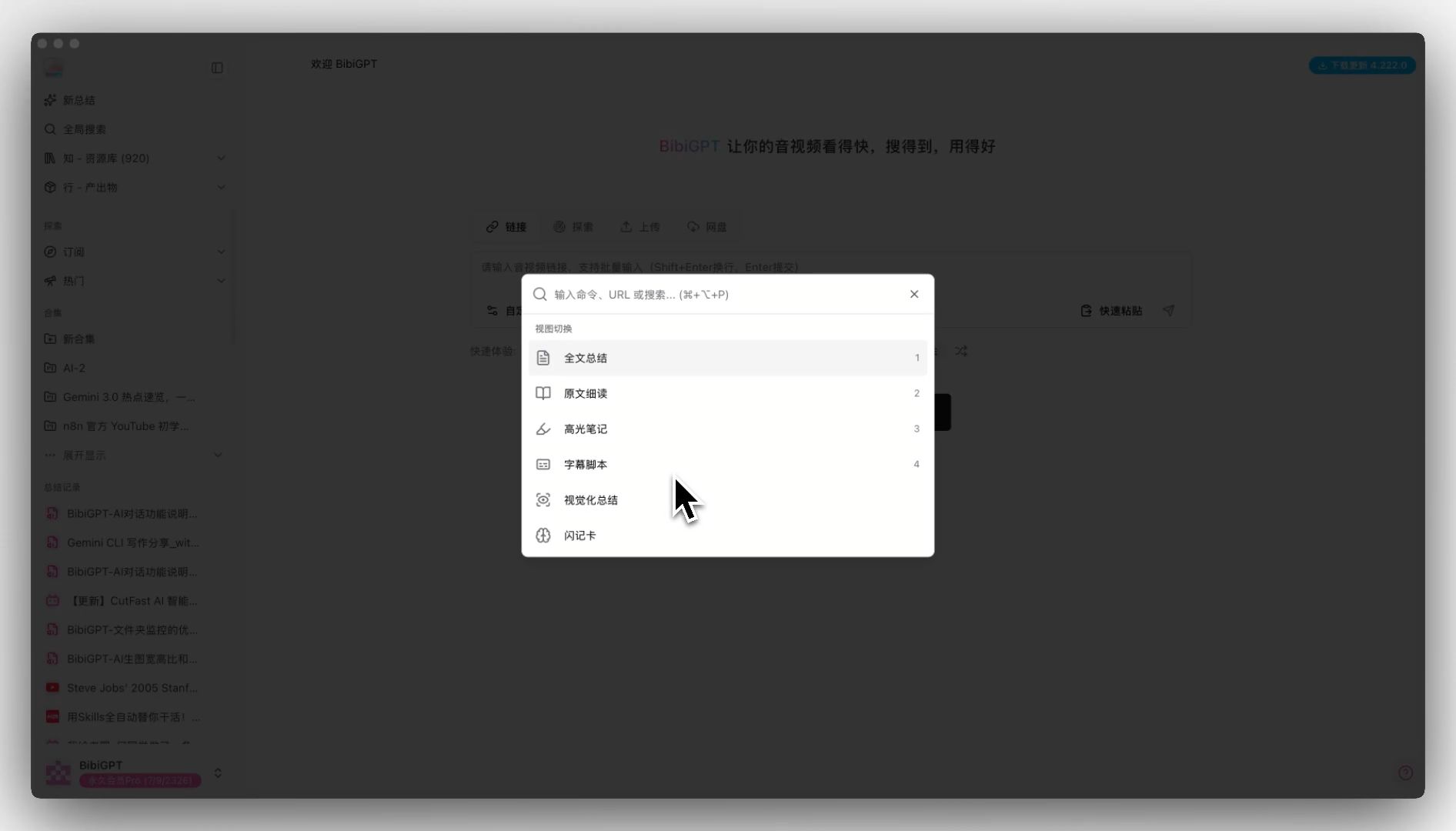 command-palette-entry
The command palette feature makes operations more efficient, especially for users who need to quickly switch between different functions. Learn more about AI audio-video summary features.
Use Effectively ✨
-
Comprehensive Multilingual Experience Upgrade We continue to advance the product's internationalization process. Core user modules, command palette, and result display modules have all completed multilingual translation, fully supporting Chinese-English switching, allowing users of different languages to enjoy a seamless experience.
-
Note Feature Optimization: Filename Length Limit Fix In response to user feedback, we've fixed the issue where note filenames might exceed the operating system's length limit, ensuring your Obsidian notes can be saved and synced smoothly without worries.
-
Interface Selection Component Optimization We've optimized the empty option handling for selection components, improving the stability and user experience of the operation interface, making every step of your operation smoother.
Summary
BibiGPT v4.228.0 updates, from auto-translate on upload to the command palette, to the comprehensive multilingual experience upgrade, every feature revolves around the core philosophy of "Watch Faster, Search Better, Use Effectively," continuously improving your AI audio-video summary and creation experience.
Whether you're a content creator, student, or professional, BibiGPT can help you process audio-video content more efficiently and transform videos into knowledge assets.
Experience BibiGPT's powerful features now and elevate your AI audio-video summary efficiency to new heights!
Start your AI efficient learning journey now:
- 🌐 Official Website: https://aitodo.co
- 📱 Mobile Download: https://aitodo.co/app
- 💻 Desktop Download: https://aitodo.co/download/desktop
- ✨ Learn More Features: https://aitodo.co/features
Happy using!
BibiGPT Team