
GPT-5 Can't Summarize Online Videos? BibiGPT Fills the Gap with AI-Powered URL Processing
GPT-5 has powerful video and audio understanding but can't process YouTube, Bilibili, or podcast URLs directly. BibiGPT bridges this gap with 30+ platform support, structured AI summaries with timestamps, mindmaps, and GPT-5 model integration.
GPT-5 Can't Summarize Online Videos? BibiGPT Fills the Gap with AI-Powered URL Processing
Bottom line: GPT-5 is a breakthrough in AI video and audio understanding -- it can analyze uploaded video files, transcribe speech, and reason across visual and audio modalities with a 1M+ token context window. But it has one critical limitation: it cannot directly process URLs from YouTube, Bilibili, TikTok, podcasts, or any other online platform. BibiGPT fills exactly this gap, supporting 30+ platforms with paste-a-link simplicity, and now integrates the GPT-5 model family directly in its model selector.
動画リンクを貼り付けてみてください
YouTube、Bilibili、TikTok、小紅書など 30+ プラットフォームに対応
What GPT-5 Brings to Video and Audio Understanding
OpenAI's GPT-5, released in 2025 and now iterated to GPT-5.4, represents the state of the art in multimodal AI. Here's what it can do:
- 1M+ token context window: Process hours of video and audio content in a single conversation, far beyond earlier models' limits
- Native multimodal processing: Text, images, audio, and video unified in one model -- no more stitching together separate tools
- Video frame analysis: Extracts keyframes at 2-4 frames per second for deep visual understanding of uploaded video files
- Advanced speech recognition: Directly extracts semantic meaning from audio, supporting multiple languages
- Cross-modal reasoning: Combines visual and audio signals to understand the full context of video content
In short, if you upload a video file to GPT-5, it can tell you what was said, what was shown, and provide sophisticated analysis of the content.
Where GPT-5 Falls Short: Online Video Processing
Despite its impressive capabilities, GPT-5 has significant gaps when it comes to real-world video consumption workflows:
1. Cannot Process Online Video URLs
You cannot paste a YouTube, Bilibili, or podcast URL into GPT-5 and get a summary. The model doesn't visit these platforms, doesn't download videos, and doesn't extract subtitles. You must download the video file yourself and upload it manually -- a dealbreaker for anyone processing multiple videos daily.
2. No Support for 30+ Video Platforms
Bilibili, Xiaoyuzhou (podcasts), Ximalaya, Douyin, Kuaishou, Xiaohongshu, Apple Podcasts, TikTok, Twitter/X... these are the platforms where people actually consume content. GPT-5 can't connect to any of them directly.
3. No Structured Output
Even when you successfully upload a video, GPT-5 produces free-form text analysis. It doesn't automatically generate:
- Timestamped chapter summaries (click to jump to the exact moment)
- Mindmaps (visualize content structure at a glance)
- Flashcards (for review and retention)
- Structured notes (exportable to Notion, Obsidian, or Readwise)
4. No Batch Processing
Need to summarize an entire YouTube playlist or a Bilibili collection with dozens of videos? GPT-5 can't handle it -- you'd have to upload each video one by one.
How BibiGPT Complements GPT-5
BibiGPT (aitodo.co) is the #1 AI audio-video assistant with over 1 million users and 5 million+ AI summaries generated. It bridges all the gaps that GPT-5 leaves open.
Paste a Link, Get an Instant Summary
This is BibiGPT's core experience: copy any video URL, paste it into BibiGPT, and get a structured AI summary instantly. Over 30 platforms are supported, including:
- YouTube (the world's largest video platform)
- Bilibili (China's leading educational video platform)
- Podcasts (Apple Podcasts, Spotify, Xiaoyuzhou, Ximalaya, and more)
- Douyin, Kuaishou, Xiaohongshu, TikTok, Twitter/X, and other short-video platforms
- Tencent Video, Youku, and other long-form video platforms
Structured AI Summaries, Not Just Plain Text
BibiGPT doesn't just give you a paragraph of vague summary. It produces complete knowledge artifacts:
- Timestamped chapters: Every key point links to the exact moment in the video
- Mindmaps: Auto-generated content structure for instant visual comprehension
- Flashcards: Key insights turned into Q&A cards for spaced repetition learning
- AI Q&A with source tracing: Have follow-up questions? Chat with the AI and get answers with clickable timestamps pointing back to the source
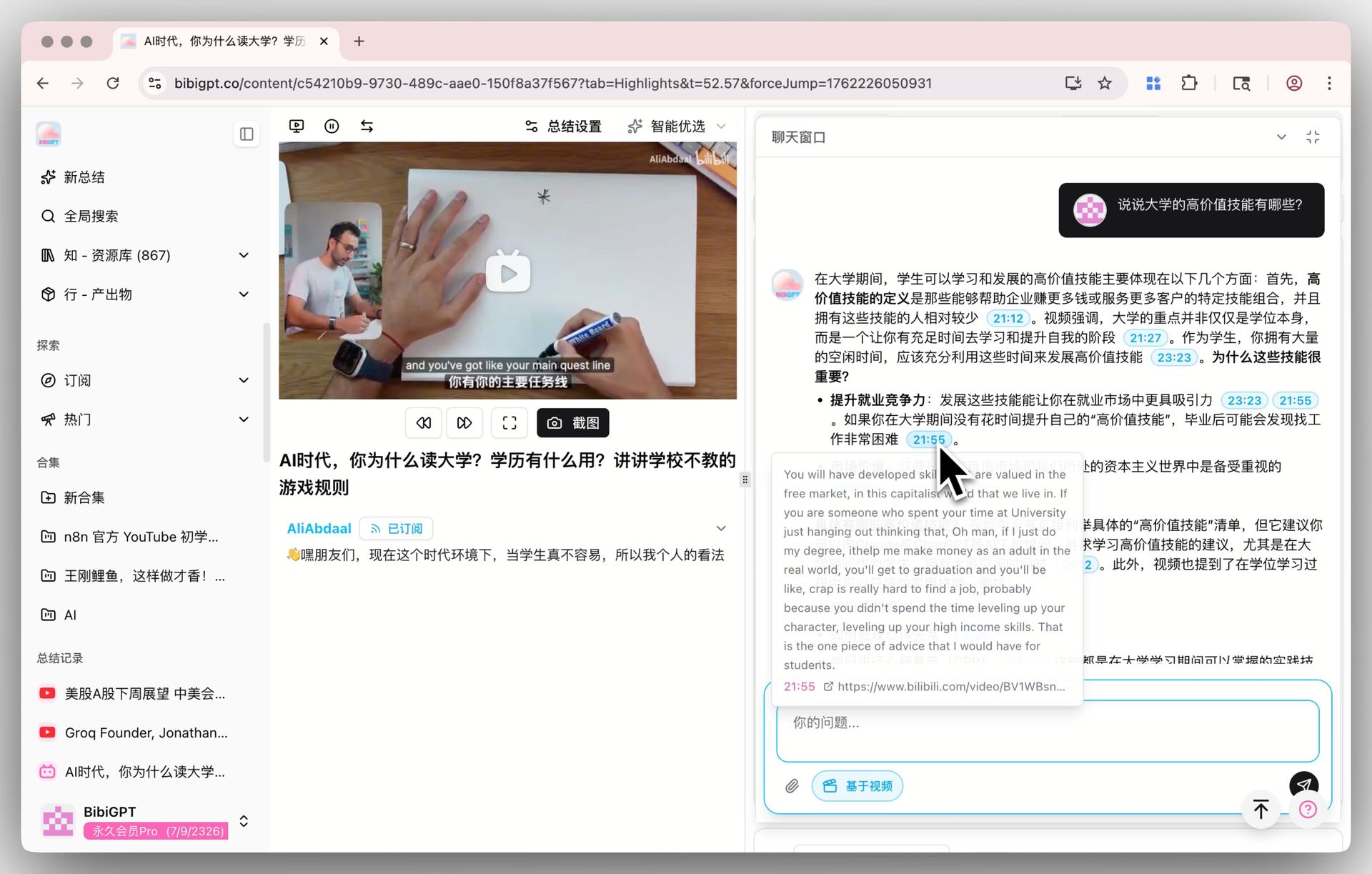 AI Video Dialog Source Tracing Demo
Export to Your Knowledge Tools
Generated summaries can be exported to Notion, Obsidian, Readwise, and other popular knowledge management tools with one click. No more manual copy-pasting -- the entire pipeline from "watching a video" to "building knowledge" is fully automated.
Using GPT-5 Inside BibiGPT
BibiGPT has integrated the full GPT-5 model family. You can select from these models directly in the model selector:
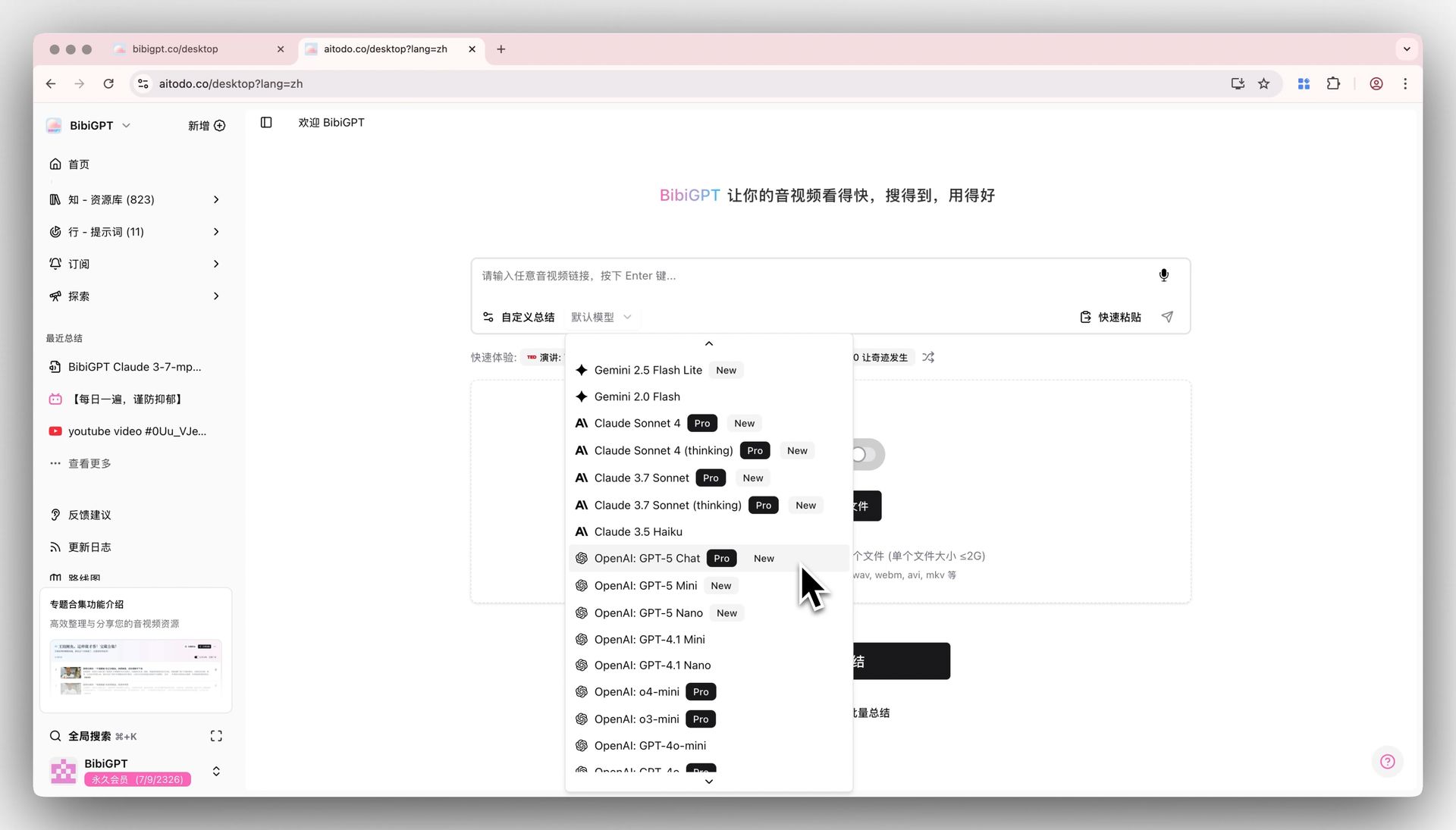 BibiGPT Model Selector with GPT-5 Support
- GPT-5 Chat: Available to paid members, ideal for users who need the highest quality summaries
- GPT-5 Mini: Available to all registered users (using free credits), balancing quality and speed
- GPT-5 Nano: Available to all registered users (using free credits), perfect for quickly scanning large volumes of content
How to use it:
- Open BibiGPT
- Paste any audio or video URL from 30+ supported platforms
- Select your preferred GPT-5 model variant in the model selector
- Click generate -- you'll get a structured summary powered by GPT-5
This means you now get the most advanced AI model + the most comprehensive platform support + the most structured output formats in one place. That's a complete experience you can't get by using GPT-5 alone.
Want to explore more AI video workflows? Check out our guide on repurposing video to blog posts with AI and the best AI podcast transcription tools in 2026.
FAQ
What's the difference between using BibiGPT and using GPT-5 directly?
GPT-5 can analyze video files you upload, but it cannot process online video URLs. BibiGPT supports direct URL parsing from 30+ platforms, automatically extracts subtitles, and generates structured summaries with timestamps, mindmaps, and flashcards. Think of BibiGPT as "GPT-5's online video frontend" -- it handles platform connectivity and content extraction, then uses the most powerful AI models to generate your summary.
Do I need to pay extra to use GPT-5 in BibiGPT?
GPT-5 Chat is exclusive to paid members. GPT-5 Mini and GPT-5 Nano are available to all registered users using free credits. You don't need a separate OpenAI subscription -- just sign up for BibiGPT and start using these models right away.
What export formats does BibiGPT support?
BibiGPT supports export to Notion, Obsidian, Readwise, and other popular knowledge management tools. You can also export as Markdown, PDF, and other universal formats. Mindmaps, flashcards, and timestamped summaries can all be exported with one click.
How long of a video can BibiGPT handle?
BibiGPT supports everything from short clips of a few minutes to podcasts and lectures lasting several hours. For extra-long content, the system automatically optimizes its processing strategy to ensure comprehensive and high-quality summaries.
Can I process multiple videos at once?
Yes. BibiGPT supports batch processing for YouTube playlists and Bilibili collections. Submit an entire playlist and get individual summaries for each video automatically.
Conclusion
GPT-5 has pushed AI video and audio understanding to unprecedented heights, but there's still a gap between "understanding video" and "processing online video at scale." BibiGPT bridges that gap -- combining the most advanced AI models' comprehension capabilities with 30+ platform URL parsing, structured output, and knowledge management integration.
If you need to efficiently extract knowledge from videos and podcasts every day, the BibiGPT + GPT-5 combination is the optimal solution available today.
Start your AI-powered learning journey now:
- 🌐 Website: https://aitodo.co
- 📱 Mobile App: https://aitodo.co/app
- 💻 Desktop App: https://aitodo.co/download/desktop
- ✨ Explore Features: https://aitodo.co/features