
BibiGPT v4.237.0 Update: Output Collapsing, CLI Speed Boost & Deep Note Integration - Comprehensive Experience Upgrade!
BibiGPT v4.237.0 brings multiple feature updates and experience optimizations, including output collapse/expand optimization, AI Watch Later Chrome extension updates, command-line support, Pro member concurrent task enhancement, note export with original subtitles, and more to fully upgrade your audio-video learning and content creation experience.
BibiGPT v4.237.0 Update: Output Collapsing, CLI Speed Boost & Deep Note Integration - Comprehensive Experience Upgrade!
Dear BibiGPT users,
This week, we bring you a series of feature updates and experience optimizations designed to make your audio-video learning and content creation experience "Quick to View, Easy to Search, and Better to Use"!
Experience BibiGPT now
Ready to try these powerful features? Visit BibiGPT and start your intelligent audio/video summarization journey!
Get started👀 Quick View
Output Collapse/Expand Optimization
This update optimizes the UI of BibiGPT's "Output" list. To address the issue of overly long pages caused by numerous output types (such as highlight notes, AI-rewritten articles, WeChat graphics, etc.), we've added a module collapse feature.
Now, users can click the arrow in the upper right corner of each section to freely collapse or expand specific content areas. This allows users to more comfortably and efficiently locate the information they need when browsing various interactive outputs generated from audio and video.
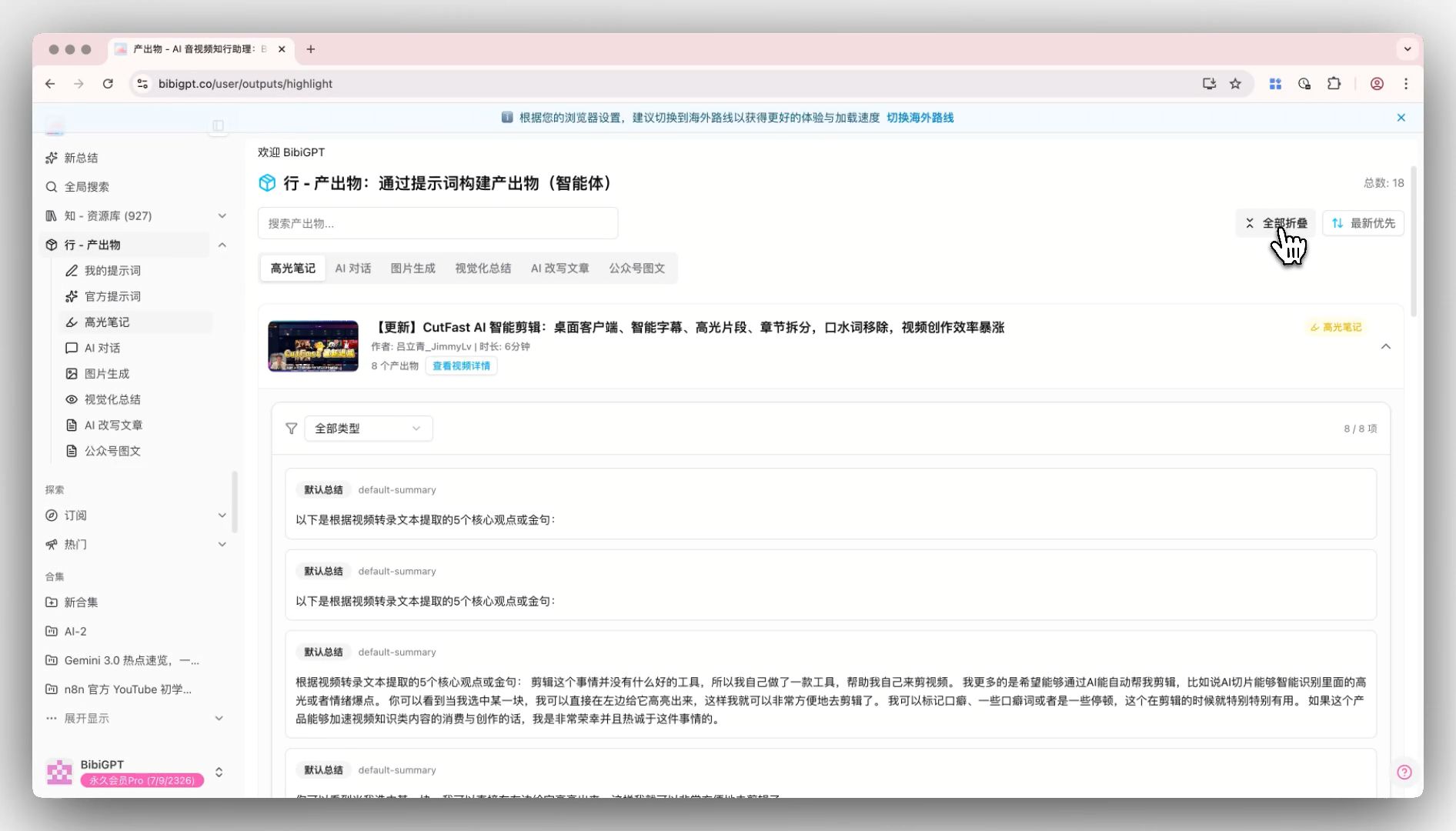 BibiGPT-Output Collapse Expand Optimization Feature-Collapse Expand Button
If you'd like to learn more about BibiGPT's powerful features, you can visit our features page.
AI Watch Later Chrome Extension Update
BibiGPT's Chrome extension "AI Watch Later" has received a major update. The new version strengthens seamless integration with your BibiGPT account, allowing users to get AI summaries, chapter divisions, and smart subtitles of videos with one click through the sidebar on YouTube pages.
Main Update Highlights:
- Chapter Summaries - Automatically divides long videos into chapters and extracts key points
- Smart Subtitles - Supports subtitle search, translation, clicking subtitles to jump to video progress, and auto-scrolling
- Exclusive Offer - Extension users get a 30% discount on BibiGPT membership subscriptions
- Deep Interaction - Provides quick access to jump directly to BibiGPT website to view original text and highlight moments
This update greatly improves the efficiency and interactive experience of accessing video content.
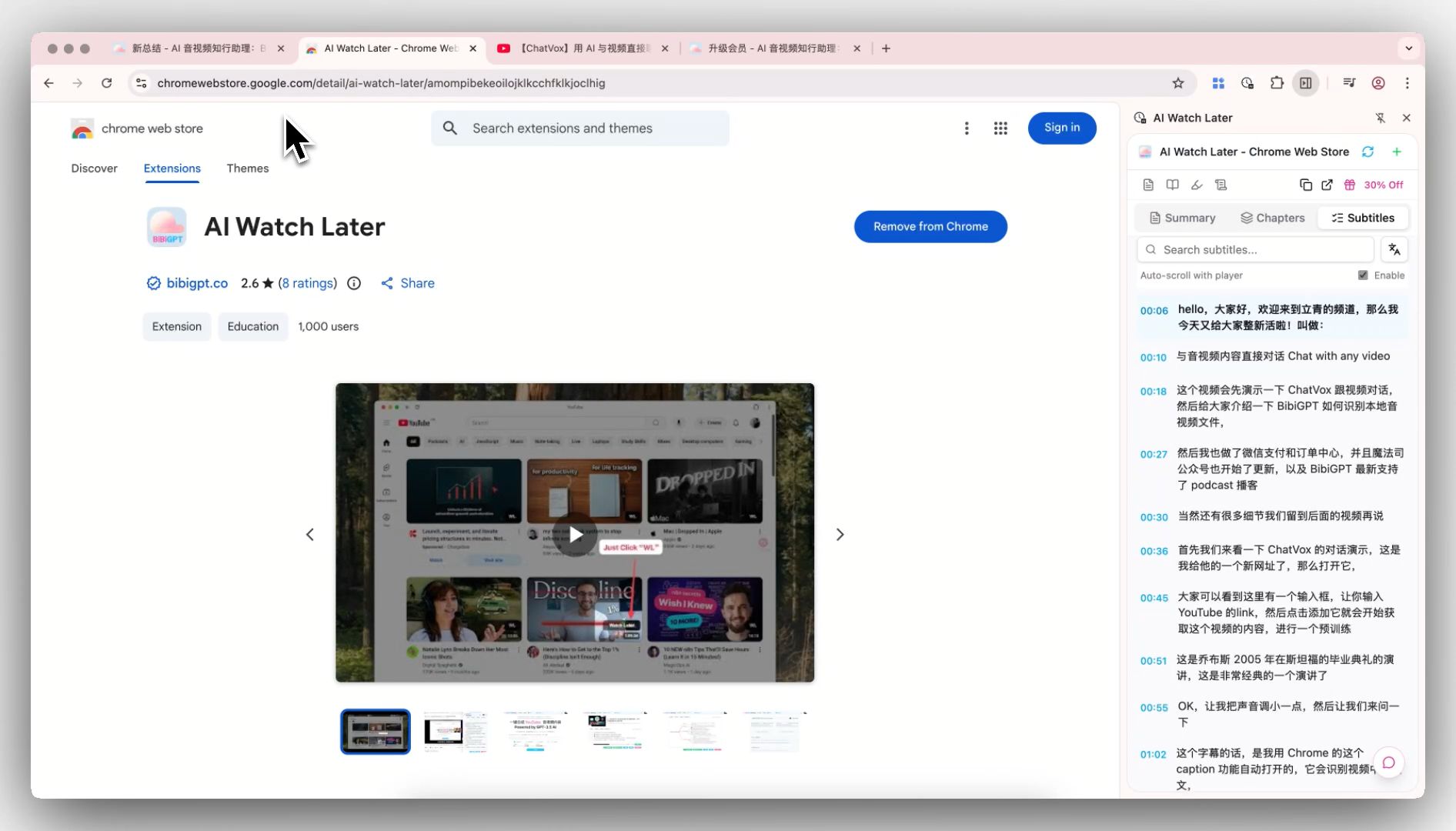 BibiGPT-AI Watch Later Chapter Summary Update Feature-Chrome Web Store Screenshot
Want to learn more efficiently on YouTube? Visit BibiGPT official website to download the extension and experience it now.
🔍 Easy Search
Command-Line Support
BibiGPT has launched brand-new command-line interface (CLI) support, further enhancing the user experience for geeks and developers.
Main Updates:
- Global Command Support - After installing the desktop client, users can directly use the
bibicommand in the terminal - Multi-Function Parameters - By entering
bibi --help, you can view supported functions, currently mainly supporting URL (web links) and File (local files) as input sources - Seamless Launch - After entering
bibi [link]in the terminal, the system will automatically launch the BibiGPT desktop app and immediately jump to the video's summary page
This feature greatly simplifies operation steps, allowing users to quickly start video summary tasks without leaving the command-line environment.
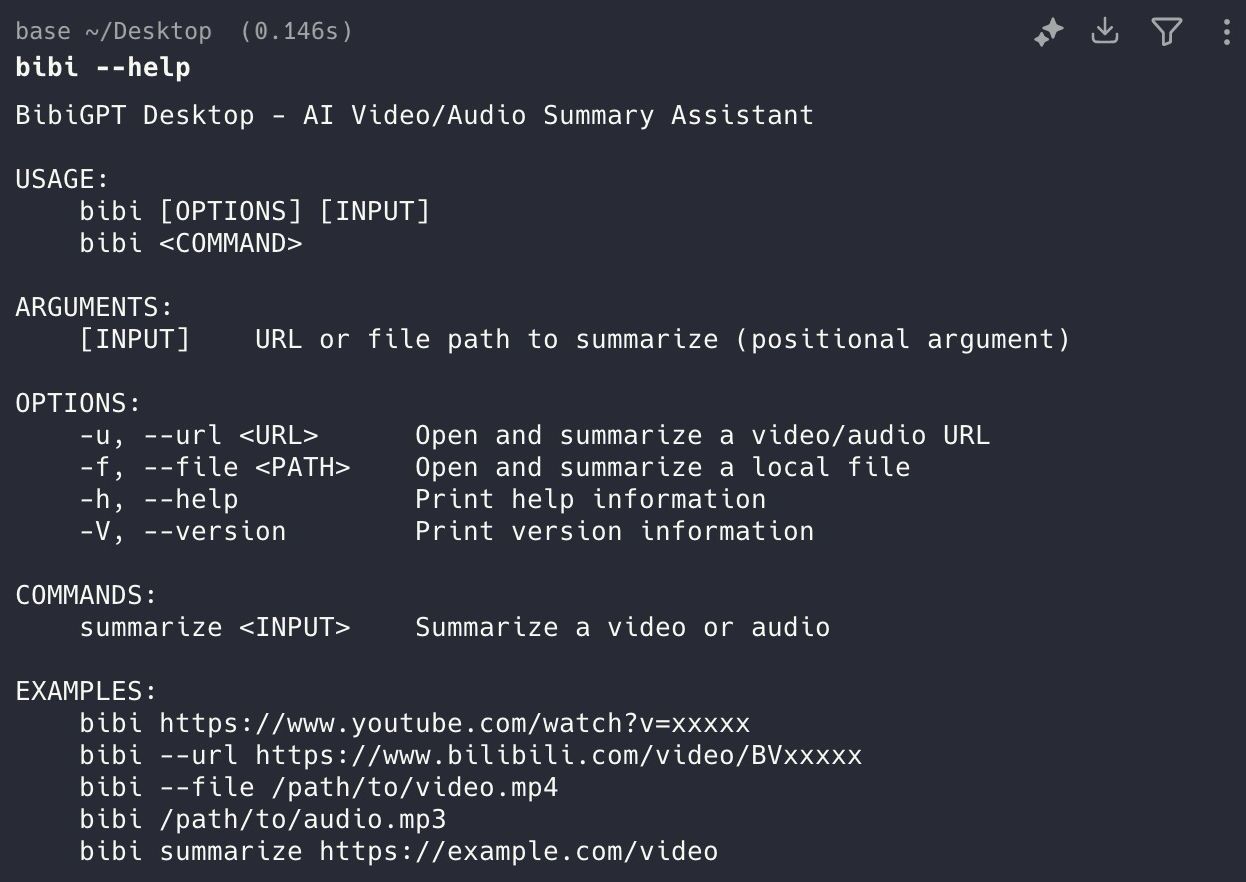 bibi-cli
🛠️ Better Use
Pro Member Concurrent Task Enhancement
We've increased the number of concurrent tasks for Pro members, bringing you faster batch processing capabilities and significantly improving your work efficiency. Whether batch processing meeting recordings, course videos, or podcast content, Pro members can enjoy a smoother experience.
Login Process Optimization
We've optimized the login experience, providing more login options and simplifying the registration process. We've re-enabled Google login, making registration and login more convenient for you.
Note Export with Original Subtitles
BibiGPT has released a practical update for note power users: Note export now supports including original subtitles.
This feature solves the pain point of users exporting notes to third-party software (such as Notion, Obsidian, Cubox, etc.) with only summaries but missing the original verbatim transcript. This is a globally effective configuration.
After enabling this feature, all subsequent note export operations will automatically include the video/audio spoken subtitle transcript. This setting is located in the "Note Integration" -> "Note Export" module in the user avatar menu at the bottom left. Users can freely enable or disable it according to their personal needs, flexibly controlling the detail level of exported content.
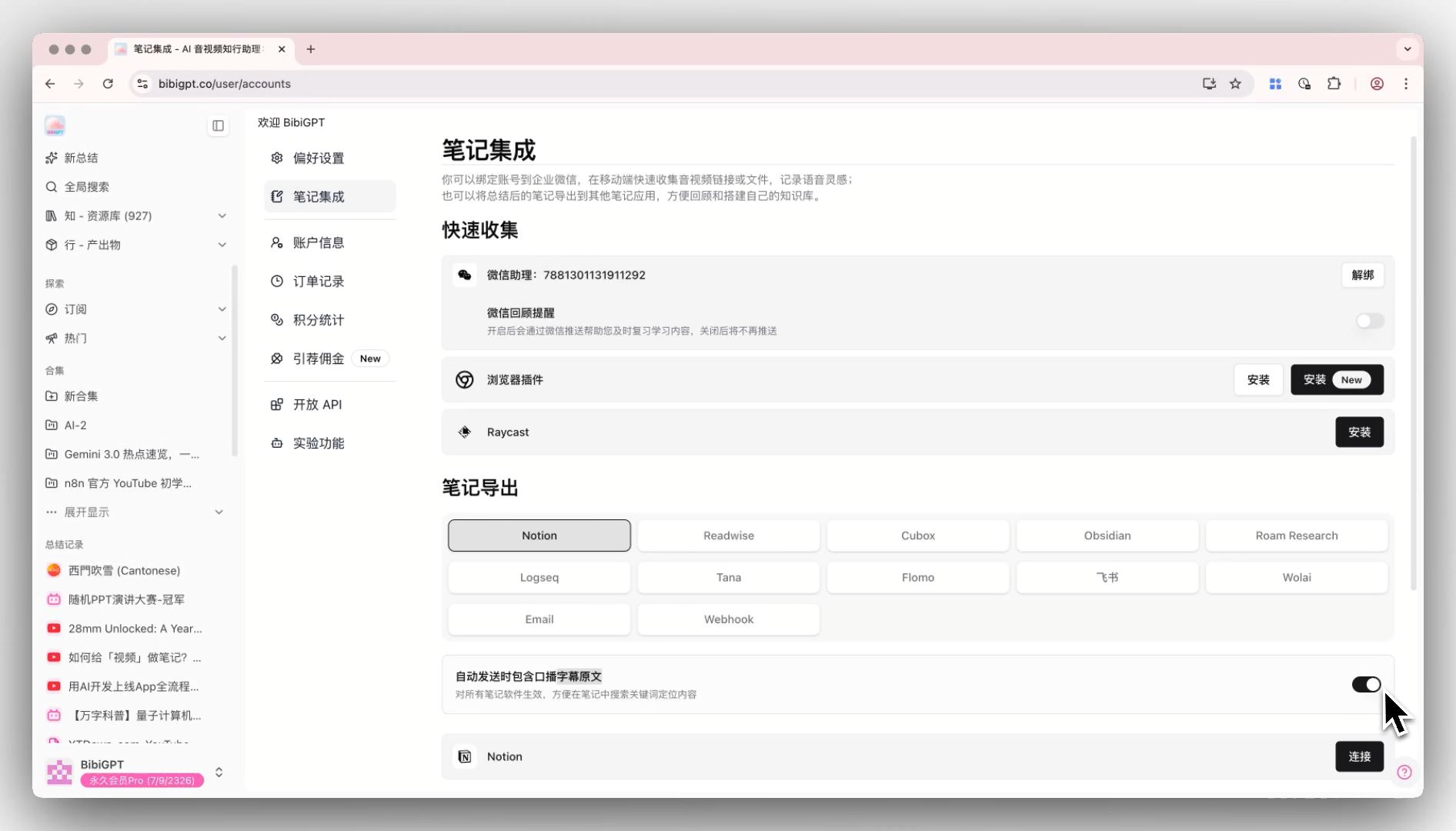 BibiGPT-Export Notes with Original Subtitles Switch Feature-Switch Entry
Export Panel Cubox Integration
BibiGPT has updated the export panel functionality, officially integrating the Cubox export option. Previously, Cubox configuration and use were limited to the settings menu, which was relatively hidden.
After this update, Cubox has been integrated into the main "Export Content" panel. If users have already completed Cubox configuration, they can now directly see the "Save to Cubox" option in the list after clicking "Export Content", alongside features like saving to Notion.
This improvement greatly simplifies the operation path for Cubox users to collect video summaries, solving the previous pain point of hard-to-find entry points.
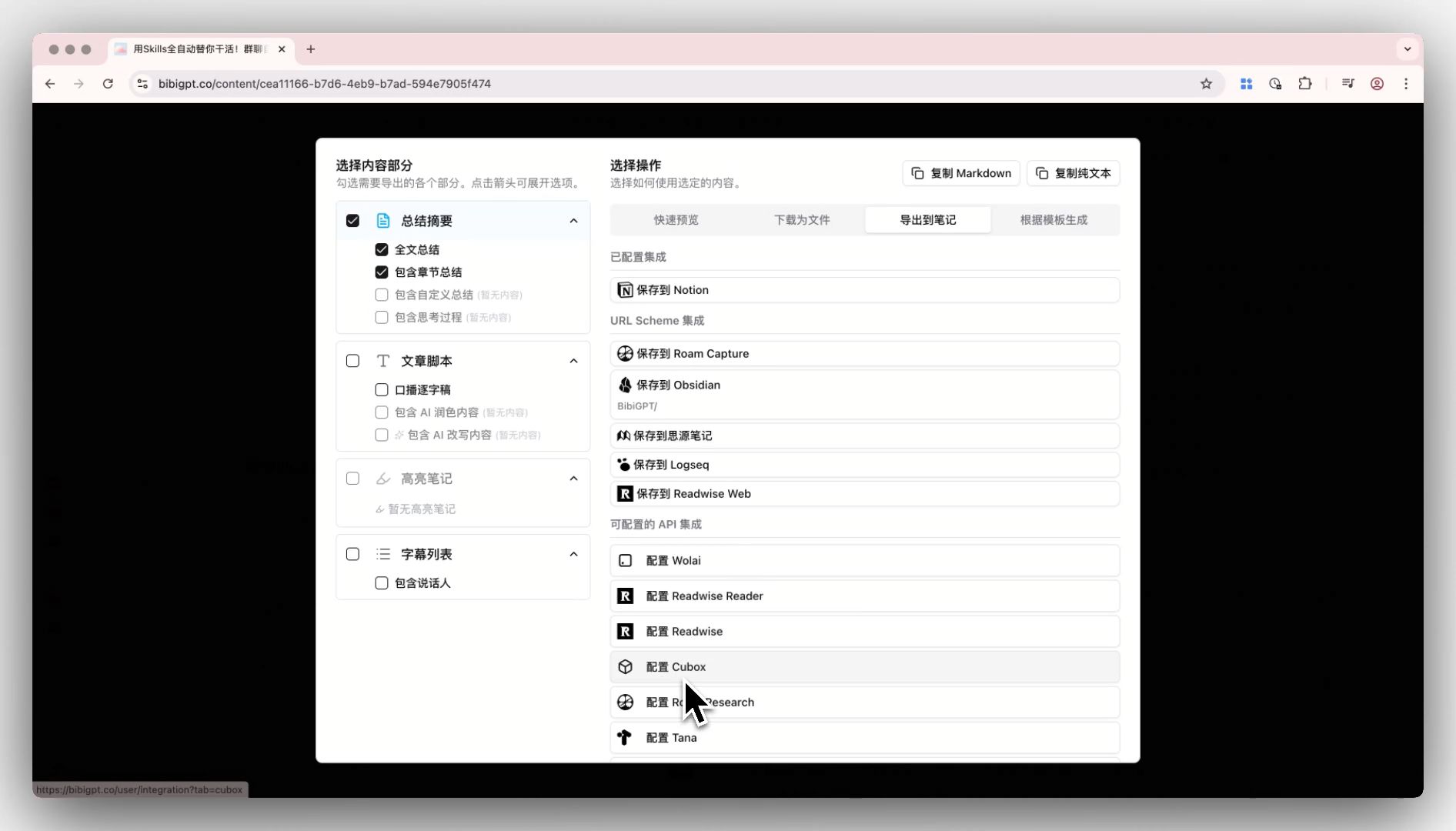 BibiGPT-Export Panel Cubox Support-Export Panel Entry
Note App Integration Retry Logic
We've optimized the retry logic for note app integration, significantly improving integration stability and ensuring your notes can sync more reliably to your chosen platform.
Have feedback or ideas?
We value your input! If you encounter issues or have suggestions, please let us know anytime.
Submit feedbackSummary
BibiGPT's updates this week, from output collapse/expand optimization to major Chrome extension upgrades, from command-line support to enhanced note exports, every feature revolves around the core philosophy of "Quick to View, Easy to Search, and Better to Use", continuously improving your audio-video learning and content creation experience.
Whether you're a student, professional, or content creator, BibiGPT can help you process audio-video content more efficiently and transform videos into knowledge assets.
Start your AI efficient learning journey now:
- 🌐 Official Website: https://aitodo.co
- 📱 Mobile Download: https://aitodo.co/app
- 💻 Desktop Download: https://aitodo.co/download/desktop
- ✨ Learn More Features: https://aitodo.co/features
Enjoy!
Experience BibiGPT now
Ready to try these powerful features? Visit BibiGPT and start your intelligent audio/video summarization journey!
Get startedBibiGPT Team